# Users, teams and roles

The access model: how roles compose, what team membership changes, and how seats and offboarding work.

Source: https://replicatelabs.ai/docs/admin/users-teams-roles
Last updated: 2026-09-03

---

## The model

<figure class="dfig">
<div class="dframe">
<div class="danat">
<div class="danat-row"><b>Company</b><span>The account. Carries a seat limit, the knowledge base, and the configured personas, products, scorecards and roleplays.</span></div>
<div class="danat-row"><b>User</b><span>One named human. Holds a <b>list</b> of roles, not a single role.</span></div>
<div class="danat-row"><b>Team</b><span>A group of users. Membership carries its own role, so someone can be a plain user in the account and a manager of one team.</span></div>
<div class="danat-row"><b>Tag</b><span>A cross-cutting label used to scope things, most usefully knowledge, to a set of users who are not a team.</span></div>
</div>
</div>
<figcaption><b>Four objects.</b> The list-of-roles design is the one that surprises people, and it is what avoids duplicate logins.</figcaption>
</figure>

## Roles

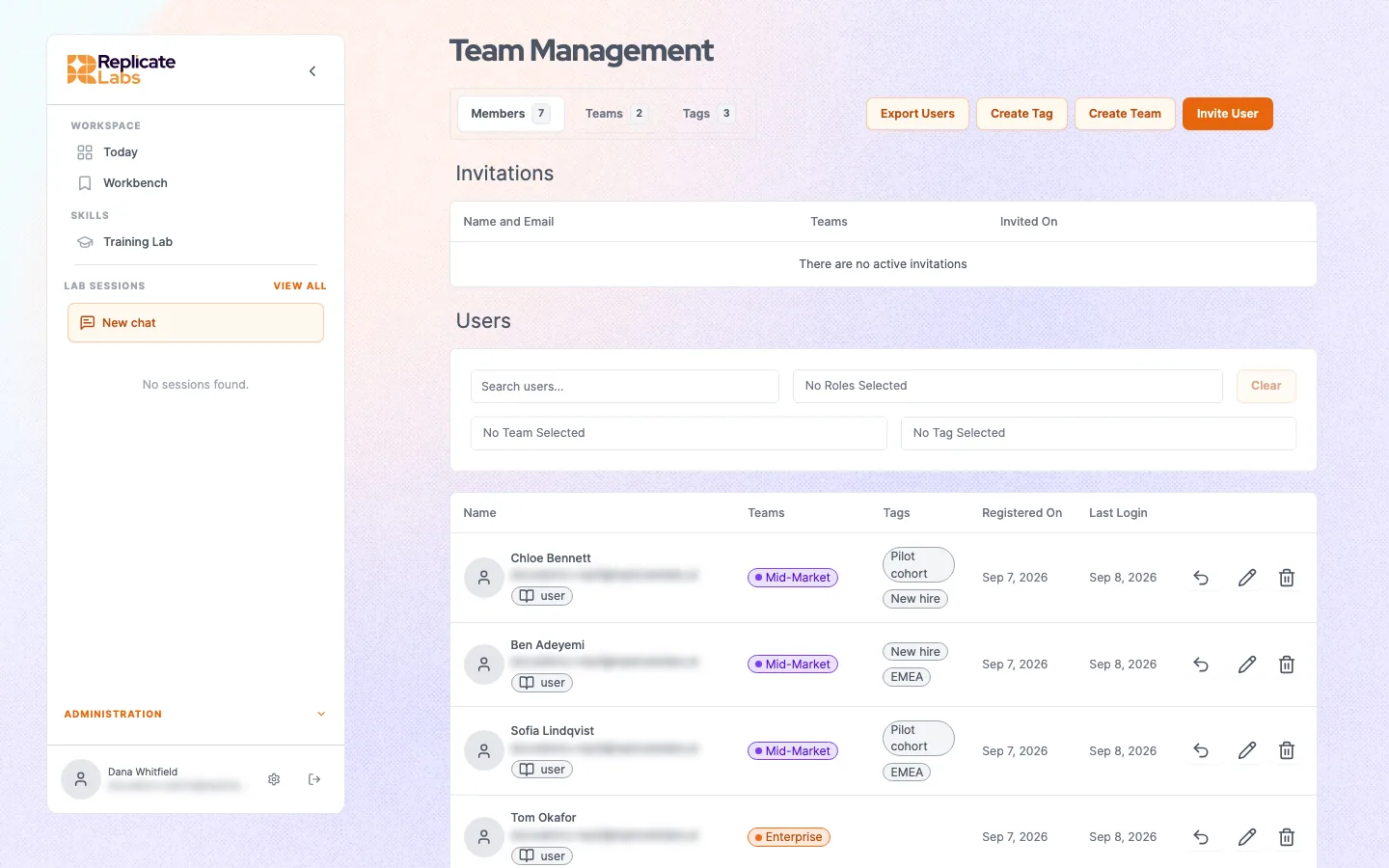
`roles` is a list drawn from `admin`, `manager` and `user`.

<figure class="dshot">
<img src="/img/docs/admin-team-management.webp" alt="Team management showing members with their teams, tags and roles" width="1440" height="900" loading="lazy" />
<figcaption><b>Team management.</b> Each user carries their teams, their tags and a list of roles. Email addresses are obscured here.</figcaption>
</figure>


| Role | Grants |
| --- | --- |
| `user` | The rep surface: their coach, their conversations, their roleplays, their own scores. |
| `manager` | The manager surface as well: the manager coach and visibility of teams they manage. |
| `admin` | Configuration as well: users, teams, knowledge base, personas, products, scorecards, roleplays. |

Because it is a list, a sales leader who carries their own deals holds `user` and `manager` on one login and switches surface. Do not create a second account for this; you will pay for two seats and split their history across both.

<div class="dnote warn">
<span class="dnote-h">Do not give admin by default</span>
<p>Admin genuinely widens what someone can reach: records across the whole company rather than their own teams, plus every configuration surface. Grant it because a person configures the account, not so they can "see everything". A manager already sees their own teams' records without it.</p>
</div>

## Teams

Teams do three jobs.

- **Manager visibility.** A manager sees the teams they manage.
- **Knowledge scoping.** A document can be scoped to a team rather than the whole company. See [What your coach knows](/docs/admin/knowledge-base).
- **Deployment.** A roleplay can be published to a team so everyone runs the same scenario and the results are comparable.

Team membership carries its own role, which is how a player-coach works: `user` at company level, `manager` on their own team.

<div class="dnote">
<span class="dnote-h">An empty team is a silent failure</span>
<p>A team with no members reports nothing and receives nothing published to it, and neither state produces an error anywhere. If a manager tells you their team view is empty, check the membership before you check anything else.</p>
</div>

## Seats

A company carries a seat limit. A seat is one named human, and sharing one is not supported. A limit of zero means unlimited.

If you cannot add a user and nothing explains why, the seat limit is the first thing to check.

## Offboarding

Two levels, and they are different.

- **Deactivate.** The user can no longer sign in. Their history remains, which is what you want when someone changes role or goes on leave.
- **Delete.** Removing a user or an account outright, for an erasure request, is handled as a request to us rather than from inside the product. Deactivation is the in-product action.
- **Reset coaching history.** Clears a user's conversations, chats and the memory built from them, leaving the account intact. Available to administrators and to managers for users on their teams. Useful when someone changes territory and wants a clean start, and destructive if used casually: the coach loses everything it had learned about that person's deals, which is most of its value to them. There is no undo.

Deactivation is reversible and a reset is not, so deactivate first unless you have specifically been asked to erase. See [Data, retention and deletion](/docs/security/data).
