# Replicate Labs documentation
The complete product documentation for Replicate Labs, the GTM harness.
Canonical HTML: https://replicatelabs.ai/docs
---
# Documentation
Section: Getting started
Source: https://replicatelabs.ai/docs
How the coaching platform works, what your coach can do, and where to look when something is not behaving the way you expect.
Your team has an AI sales coach that works the deals you are actually running. Not a scenario library, not a transcript summariser. You bring a live opportunity, you talk it through, and you leave with a next move.
These pages cover what the coach can do, how to get a useful answer out of it, how roleplay and scoring work, what a manager can see, and how an administrator configures the account.
## A coach is four things
Understanding this explains almost every behaviour you will meet.
MethodologyThe sales framework it reasons from. It is not a personality setting. It determines which questions it asks, what it treats as evidence, and what it will tell you is missing.
MemoryWhat it knows about your deals, carried across every conversation you have had about them. Scoped to you, and no colleague can reach it through the same coach.
KnowledgeWhat your organisation has taught it: products, buyers, competitors, qualification bar, methodology documents. Shared across the account, maintained by an administrator.
VoiceA real spoken conversation, with the coach on camera. This is the primary way to bring it a deal, not an advanced feature.
The anatomy of a coach. Swap the methodology and you get a different coach, not a different tone of voice.
Your coach has a name and a face in your workspace, and your organisation may run more than one: a coach for reps, and a separate manager coach for the people running the team.
## What a session looks like
1You bring something realA named opportunity, a call you just came off, a draft, a stage you are stuck in.
2It works the methodologyAgainst everything it already knows about that deal and your business.
3It pushes backYou get asked what you confirmed, not what you assumed.
4You get the next moveIn words you could use on the call, not a principle.
And it remembers. The next conversation about that deal starts where this one ended, which is why the second session is better than the first.
The coaching loop. Identical whether you talk it or type it.
## Where it fits in a week
The platform is not somewhere you go to practise and then leave. It sits across the working day in three distinct places, and teams that only use one of them get roughly a third of the value.
PrepareBefore the call. Working out what you need, what you will ask, what you do if they open on price. This is where roleplay belongs.
ExecuteOn the live deal. The stalled opportunity, the objection, the proposal that needs framing, the account you are single-threaded in.
ImproveAfter. What the call exposed, and where the same gap keeps appearing across your deals. Managers read this layer across the team.
Three moments, one coach. Most tools cover only the first.
## Start here
## Reading these docs as a machine
Every page is also served as plain Markdown at the same URL with `.md` on the end. There is an index at [`/docs/llms.txt`](/docs/llms.txt), and the whole corpus in one fetch at [`/docs/llms-full.txt`](/docs/llms-full.txt).
---
# Signing in
Section: Getting started
Source: https://replicatelabs.ai/docs/getting-started/signing-in
Sign-in methods, what a role actually controls, and why the screen you see may differ from a colleague's.
## How to sign in
Your workspace has its own web address. An administrator or your provider will have sent it to you; it is the same address every time and worth bookmarking.
Three sign-in methods are supported, and which ones are enabled is set at the account level:
Email and passwordThe default. Available on every account.
GoogleSign in with a Google account. Common where the organisation runs Google Workspace.
Your own identity providerEnterprise accounts can sign in against their existing provider, Okta for example. Set up once, by agreement, during onboarding.
Sign-in methods. If single sign-on is enabled for your organisation, use it. Password accounts and SSO accounts are not automatically the same person.
For the full picture, including what an administrator can see and control, read [Authentication and access](/docs/security/access).
## Roles decide what you see
A role is not a seat. One person holds a list of roles, and the surface changes to match.
| Role | What it gets |
| --- | --- |
| `user` | The rep surface. Your coach, your conversations, your roleplays and your own scores. |
| `manager` | The manager surface as well: the manager coach, and visibility of the teams you manage. |
| `admin` | Configuration as well: users, teams, knowledge, roleplays, scorecards. |
Because roles are a list, a sales leader who also runs their own deals holds `user` and `manager` on one login and switches between the two surfaces. They do not need, and should not have, a second account.
Why your screen differs from a colleague's
Two things drive it. Your roles, and the coach you are currently on. The buttons above the composer belong to the coach and to the active role, so a manager looking at the rep coach sees the rep buttons, not the manager ones. If a colleague describes a button you cannot find, check both before assuming it is a fault.
## Team membership
Users belong to teams, and team membership carries its own role. That is how one person can be a `user` in the account overall but a `manager` of one specific team, which is the normal shape for a player-coach.
Teams also determine what a manager sees and how knowledge can be scoped. See [Users, teams and roles](/docs/admin/users-teams-roles).
## Seats
An account carries a seat limit, which an administrator can see. A seat is one named human. Accounts can be set to unlimited seats, in which case no limit is enforced.
If you cannot add a user and no error explains why, the seat limit is the first thing to check.
---
# Finding your way around
Section: Getting started
Source: https://replicatelabs.ai/docs/getting-started/finding-your-way
The surfaces you will actually use: the coach home, the composer, the call, the Training Lab and configuration.
Your workspace is branded for your organisation, so colours, names and the coach's face will not match a screenshot from anywhere else. The structure underneath is the same.
## The coach home
Where you land. It holds three things worth knowing about.
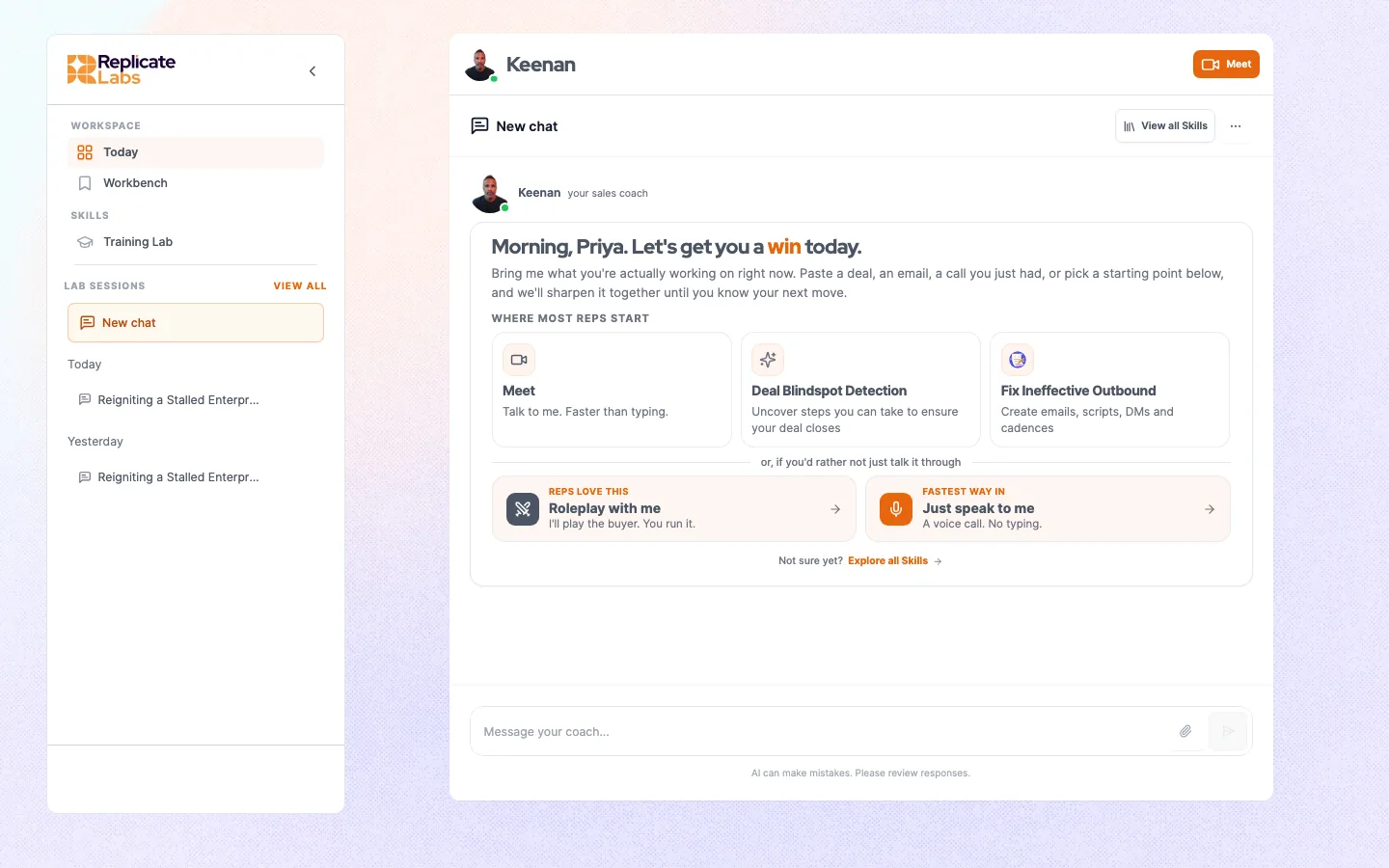
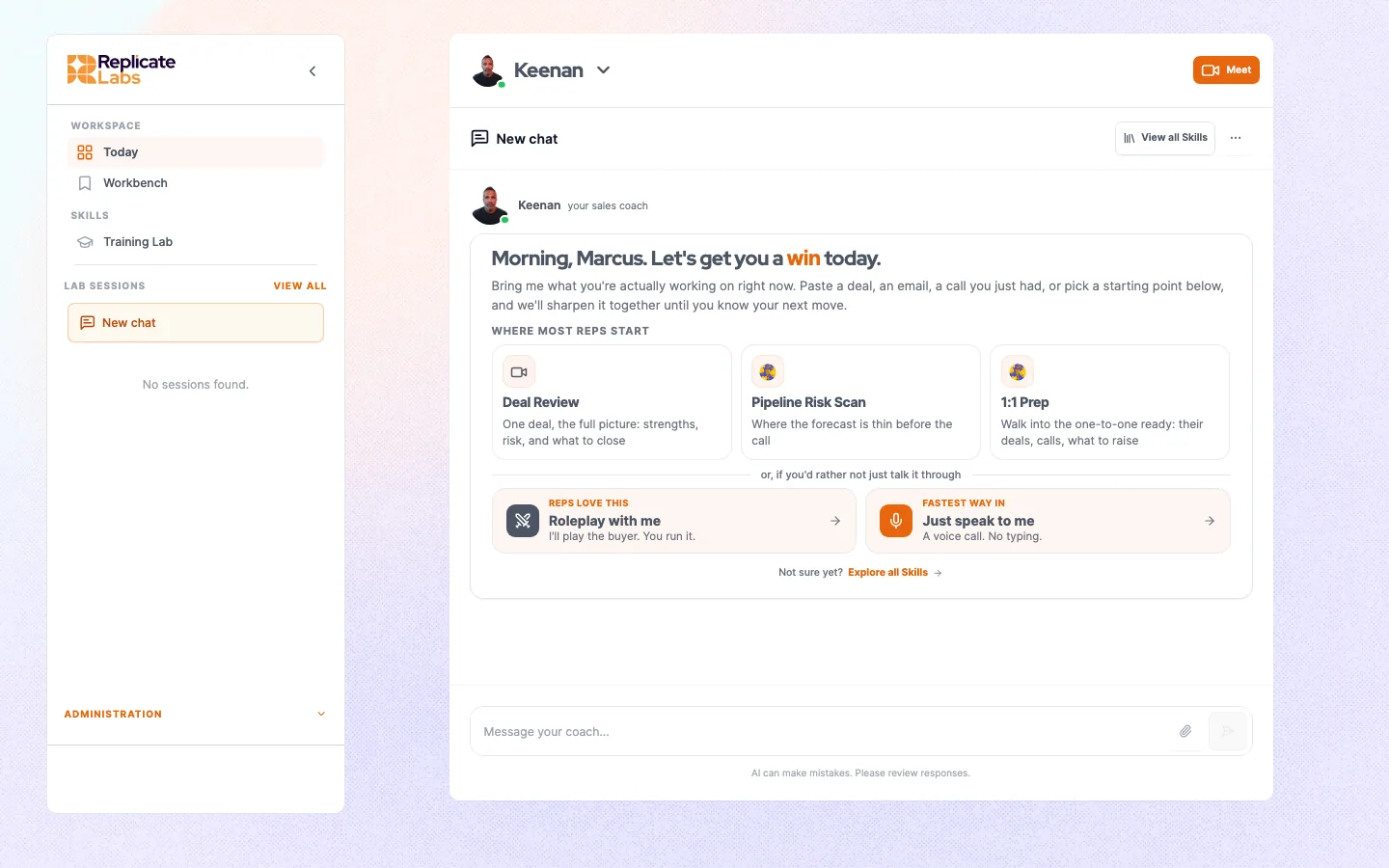
The coach home. The coach selector sits top left, past sessions in the sidebar, the button row above the composer. Your workspace carries your organisation’s branding, so the colours and the coach will not match this exactly.
Coach selectorTop left. Switches between the coaches your account runs. Your history stays with each coach, so switching does not lose a thread. The platform remembers your last selection, so if a screen looks wrong, check which coach you are on.
Button rowAbove the composer. Prepared ways in, specific to your account and your current role. See Coach buttons.
ComposerThe message box. Typing is one of two ways to work; the other is a call.
The coach home. The button row and the coach selector are the two controls people miss.
## The call
The live spoken conversation. The coach appears on camera and you talk to it. This is the default way to bring a deal, not an advanced mode. See [Bring a deal to a call](/docs/coaching/bring-a-deal).
You will be asked for microphone access the first time. If the browser blocks it, nothing tells you loudly; the call simply never starts properly. See [Troubleshooting](/docs/reference/troubleshooting).
## The Training Lab
Where roleplays live. You pick a roleplay, pick the persona, and run a spoken conversation against a buyer. Afterwards you get a graded read.
What you see there is what is configured for the coach you are currently on, so if the list looks unfamiliar, check the coach selector before anything else.
## Configuration
Administrators get a configuration area covering users and teams, the knowledge base, personas, products, scorecards and roleplays. It is described through the [Administration](/docs/admin/users-teams-roles) section.
Some parts of a coach, its prompts, its button set and which skills it carries, are configured by your provider rather than in this area. See [Coach configuration](/docs/admin/coach-configuration).
---
# Your first week
Section: Getting started
Source: https://replicatelabs.ai/docs/getting-started/first-week
A day-by-day route from first sign-in to the point where reaching for the coach is a reflex rather than a task.
Most people who abandon an AI coach do it in the first three days, and almost always for the same reason: they opened it with nothing real in hand, got a generic answer, and concluded it was generic.
This page is the route that avoids that.
The one rule
Every session in your first week should be about a named, live opportunity or a call that is actually in your calendar. Not a hypothetical, not a test, not "show me what you can do". The coach is built to work specifics, and it is only impressive on specifics.
## Day one: bring the deal that is keeping you up
Not the easiest deal. The one where you cannot honestly say what happens next.
Open a call, name the account, and describe it the way you would to a colleague who has to help you. Expect the first few minutes to be the coach finding out what you actually know rather than telling you anything.
End with two asks: give me the words I open the next conversation with, and tell me what you need me to find out.
Twenty minutes. That is the whole of day one.
## Day two: bring a call you have already had
Take a conversation from the last week, ideally one that went sideways, and work it through. If your account has a recording or notes tool connected, point the coach at the call rather than describing it from memory. What was actually said is reliably different from what you remember being said, and the gap between the two is where the coaching is.
## Day three: rehearse something before you do it
Find a conversation coming up that you are not looking forward to and [run a roleplay](/docs/roleplay/running-one) against it. Read the score afterwards, and take the weakest criterion straight to your coach rather than immediately running the roleplay again.
Why day three matters
Day three is where the platform stops being a thing you were told to use. People who do a meaningful piece of work on day three keep going; people who have not opened it by then usually never do. If you manage a team, this is the day to check on, not week four.
## Day four: come back to day one's deal
This is the session that shows you what the product actually is. Say the account name and stop talking.
The coach will pick up where you left it, and it will ask about the thing it told you to go and find out. If you did not do it, it will notice. That is the point, and it is the closest thing in software to a manager with unlimited time and perfect recall.
## Day five: use it for something small
The habit is built on small uses, not on set-piece deal reviews. A tightened follow-up email. A second opinion on one line of a proposal. A quick read on whether an objection is real or a brush-off. Two minutes each.
The reps who get the most out of it are not the ones running the longest sessions. They are the ones who reach for it without deciding to.
## After week one
1WeeklyEvery open deal that is not moving gets a conversation. Fifteen minutes each.
2Before every call that mattersPrepare, or rehearse, or both.
3After every call that surprised youWork out what you missed while it is still fresh.
The steady-state rhythm. Roughly an hour a week, spread thin rather than blocked out.
---
# How coaching works
Section: Coaching
Source: https://replicatelabs.ai/docs/coaching/how-it-works
What the coach is reasoning from, why it interrogates your evidence, and the limits worth knowing before you rely on it.
## Methodology is the engine, not the skin
Your coach is built on a specific sales methodology. That choice determines what it asks, what it accepts as evidence, and what it tells you is missing. It is not a style setting layered over a general assistant.
Concretely: a coach built on a problem-centred methodology will keep returning to whether you have quantified the buyer's problem, because in that framework an unquantified problem is the reason deals stall. A coach built on a value-centred framework will keep returning to the business issue and who owns it. Ask each the same question about the same deal and you get different, internally consistent answers.
This is why the coach is configured to the way your organisation actually sells, rather than shipped generic. It is also why an answer that feels repetitive is usually the methodology doing its job.
## Why it interrogates you
The coach is built to be difficult about the difference between what you **confirmed** and what you **assumed**. Most of a first conversation is it establishing which is which.
You
Budget is not an issue, they told me it is approved.
Coach
Who told you, and in what words? Was that in a meeting or on email? Did they name a figure, or did they tell you not to worry about it?
You
It was my champion, on a call. He said it would not be a problem.
Coach
Then you have a champion's opinion, not an approved budget. Those fail differently. What happens to this deal if he is wrong?
A normal exchange. The gap you cannot fill in front of your coach is the one that kills the deal three weeks later.
If you cannot answer, that is the finding. It is not a failure of the session.
## What it is working from
What you sayThe current conversation. The single largest factor in answer quality, and the one you control. See Getting a better answer.
What you said beforeYour own history on this account, carried across your coaches. See What your coach remembers.
Account knowledgeDocuments an administrator has loaded: products, buyers, competitors, methodology, qualification standards. Shared. See What your coach knows.
Connected toolsWhere enabled, the state of the opportunity in your CRM, calls, calendar and inbox. See Integrations.
Four inputs. A thin answer almost always traces to a thin input, most often the first one.
## What it will not do
It does not
Join your live customer calls or feed you prompts in real time.
Invent facts about your deal. Where it does not know, it asks.
Replace the coaching conversation with your manager.
Share your coaching sessions with your manager. See What you can see.
It does
Work an open opportunity with you, repeatedly, over its whole life.
Rehearse a specific upcoming conversation and grade it.
Give a manager a read on where a team is genuinely weak.
Hold a standard consistently, across every rep, every time.
## When it is wrong
It works from what it has been told. If it has your deal wrong, say so plainly in the conversation and the correction carries forward like anything else. If it is wrong about your *business*, that is a knowledge base problem and belongs with your administrator.
---
# Bring a deal to a call
Section: Coaching
Source: https://replicatelabs.ai/docs/coaching/bring-a-deal
The primary way to use the platform: open a call, talk the opportunity through, and leave with a next move and an agenda for next time.
A deal review is a call, not a chat. You open a call, the coach appears on camera, and you talk it through the way you would with a manager who has unlimited time and has read everything.
Talking is not the advanced route. It is the normal one. Typing is what you fall back to when you cannot speak or when the coach needs to read something long.
Why speaking beats typing here
People compress when they write. You will type "they went quiet after the demo" and move on; you will say the same thing and then keep going, because a spoken question expects an answer. The detail the coach needs is almost always in the part you would not have bothered typing.
## Starting a call
From your coach's home, open the call. Grant microphone access when the browser asks. The coach comes up on camera and opens the conversation.
You do not need to prepare. Bring what is in your head.
## What to say first
Name the account and the problem in one breath, then stop and let it ask.
Stalled"Contoso has gone quiet after the demo and I do not know why."
Pricing"I have a proposal going out Friday and I am not confident in the number."
Qualification"They told me budget was approved but nothing has moved in three weeks."
Unfamiliar room"I have a first call with a CFO tomorrow and I have never sold to one."
Openers that work. All four name a real account and a real problem. None of them asks the coach what it can do.
## The shape of a good session
1Two minutes of questionsThe coach establishing what you actually know. Answer properly; vague answers get vague coaching.
2The findingUsually the gap between what a buyer said and what you concluded from it.
3The moveAsk for the words, not the principle. "Give me how I open the next call."
4The agendaAsk what it needs you to find out. That sets up the next conversation.
Fifteen to twenty minutes. Step four is the one people skip, and it is what makes session two better than session one.
## Ending well
Two asks, every time.
**Ask for the words.** "Write me the email that gets the CFO into the room." "Give me the first thirty seconds of the next call." You want something you could send or say, not advice about sending or saying it.
**Ask what it needs next.** The coach will name the thing you have not confirmed. Write it down. It becomes the agenda for the next session, and it is the difference between a coach and a search box.
## Attaching a call you have already had
If a recording or notes tool is connected to your account, you can point the coach at a specific call instead of describing it. It reads what was actually said.
This is the highest-value single thing you can do in the first fortnight, because the difference between the transcript and your memory of the call is usually the whole coaching conversation.
## Multiple sessions on one deal
The coach carries the deal between sessions, so the right pattern is short and repeated rather than long and occasional.
1BeforePrepare the specific conversation.
2AfterWork what actually happened, against what you expected.
3WeeklyFifteen minutes on anything that has not moved.
Each pass starts from what the last one established, so the sessions get shorter and sharper as the deal progresses.
The cadence on a single opportunity.
## If the call will not start
Microphone permission is the usual cause, and it fails quietly. See [Troubleshooting](/docs/reference/troubleshooting).
---
# Working in chat
Section: Coaching
Source: https://replicatelabs.ai/docs/coaching/chat
When typing beats talking, what to paste in, how long a source can be, and how to keep a thread useful.
Chat is the same coach with the same memory of your deals. It is the right tool for three jobs and the wrong one for a fourth.
Use chat for
Long source material. A transcript, a proposal, an RFP section, a whole email thread. Paste it and ask a specific question about it.
Drafting. An email, a follow-up, a business case, a note to a sponsor. Line-by-line iteration is awkward out loud.
Anywhere you cannot speak. Open-plan office, train, customer site.
Do not use chat for
Thinking a deal through.Open a call. Typing makes people summarise, and the summary is where the useful detail goes missing.
## Pasting source material
Paste the raw thing rather than your description of it. A transcript with the speaker labels intact is worth more than a tidied version, because who said what is exactly what the coach is reasoning about.
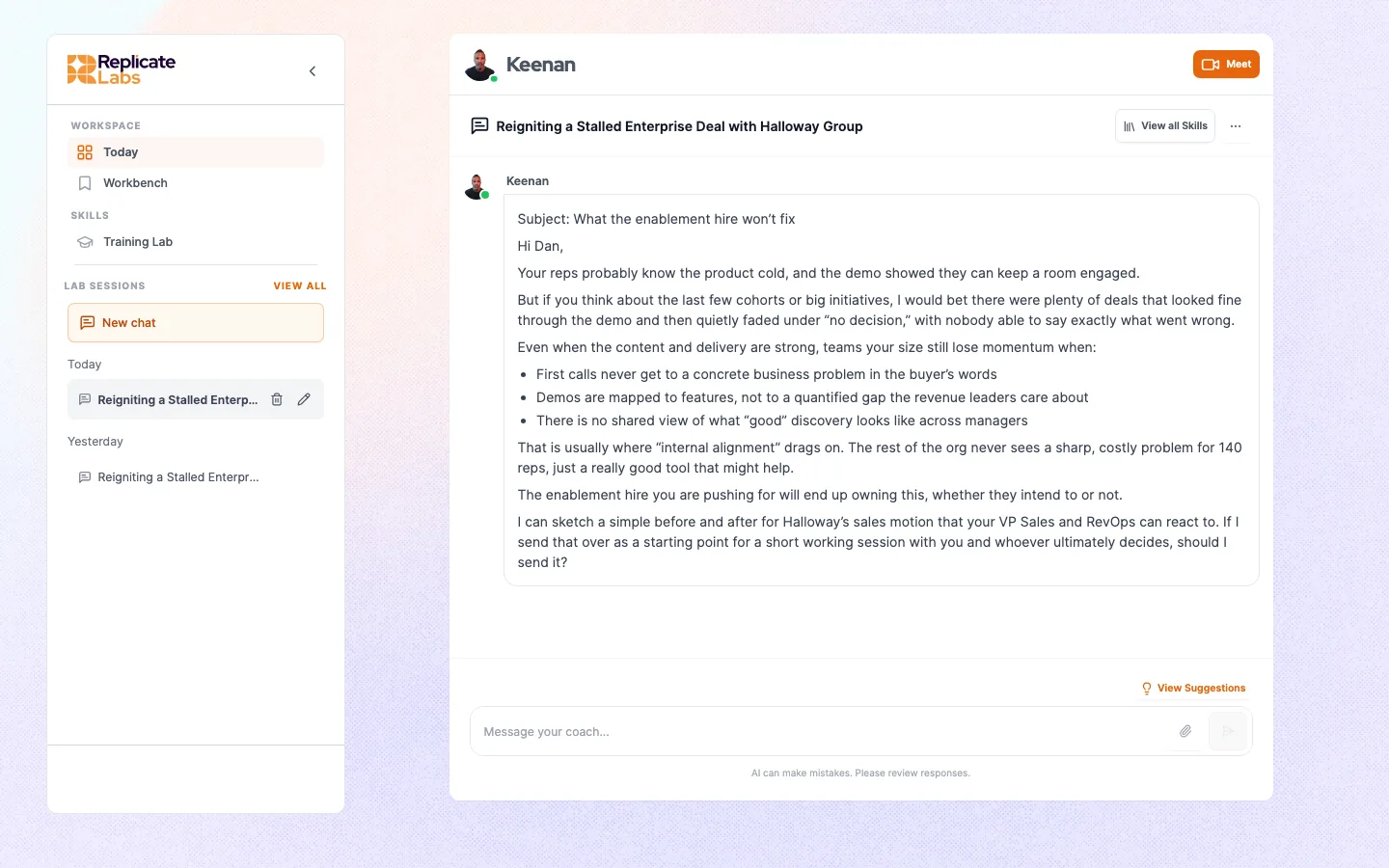
Asking for the artefact. The rep asked for the words rather than the advice, so the coach returned an email that could be sent, grounded in the account it already knows.
Then ask a specific question about it. "Improve this" produces generic edits. "The VP Finance said the timing was bad, is that a real objection or a brush-off, and what would tell us which" produces something you can act on.
## Keeping a thread coherent
A single conversation about a single deal stays sharper than one long thread covering four accounts. Start a new conversation when you change subject; the coach's memory of the account carries across conversations anyway, so you lose nothing by doing it.
## Switching coach
If your account runs more than one coach, the selector at the top left switches between them. Your memory of an account follows you rather than living in one coach, so switching does not mean re-explaining the deal.
The platform remembers your last selection between sessions. If the buttons or the behaviour look wrong, check which coach is active before assuming a fault.
## Chat and calls share memory
Anything established in a call is available in chat and the reverse. A common and effective pattern is to talk the deal through, then switch to chat and ask it to write the follow-up email off the back of the conversation you just had.
---
# Getting a better answer
Section: Coaching
Source: https://replicatelabs.ai/docs/coaching/asking-well
The difference between a generic reply and a useful one is nearly always the input. What to include, what to leave out, and how to push back.
The most common complaint about any AI coach is that the answer was generic. In almost every case the input was generic first. This page is the fix.
## Four things that change the answer
Name the accountA named opportunity lets the coach use everything it already knows about it and everything it learns in this session. An unnamed one is a hypothetical, and it will be answered like one.
Quote, do not paraphrase"He said we would need to revisit it next quarter" is evidence. "He was non-committal" is your conclusion about evidence, and the coach cannot go behind it.
Say what you want out of itA read on risk, the words for an email, a decision on whether to walk. These produce different answers. Left unsaid, you get the middle of them.
Give the constraintWho the reader is, how long it can be, what has already been tried, what you are not allowed to offer. Constraints are what make output usable rather than plausible.
The four levers. Any one of them lifts a generic answer; all four together change the character of the session.
## The same question, twice
Generic in, generic out
"How do I handle a price objection?"
Specific in, usable out
"On Contoso, the ops director said our number was 40% above the incumbent's renewal. She has not seen the implementation scope yet. I want the two questions I ask before I say anything about price, and I do not have authority to discount."
The second one names the account, quotes the buyer, states the gap in what they know, says what is wanted, and gives the constraint. It is not longer because longer is better; every clause is doing work.
## Push back on the answer
The coach is not fragile and the first answer is not final. Useful follow-ups:
- **"That assumes she is the decision maker. She is not."** Corrections carry forward, so this improves everything after it too.
- **"Too long. Half that, and drop the pleasantries."**
- **"Give me the version that works if she has already decided against us."**
- **"What would have to be true for this to be a bad idea?"**
- **"Say it the way I would say it, not the way a consultant would."**
## Ask for the artefact, not the advice
The single highest-leverage habit. Compare "how should I follow up" with "write the follow-up". The first gets you principles you already knew; the second gets you something to edit and send, and the editing is where you find out whether the coach understood the deal.
## When the answer is still thin
Three causes, in order of likelihood.
1. **The input was thin.** Re-read what you sent as if you were the coach. Could a stranger act on it?
2. **The coach does not know something about your business.** If it is wrong about your product, your pricing model or your competitors, that is a [knowledge base](/docs/admin/knowledge-base) gap, and it belongs with your administrator rather than with you.
3. **You are asking the wrong coach.** A rep coach is built to work one deal; a manager coach is built to read across a team. Asking either to do the other's job produces something bland.
---
# Coach buttons
Section: Coaching
Source: https://replicatelabs.ai/docs/coaching/coach-buttons
The row above the composer: what each button does, why one might do nothing when clicked, and how the set is decided.
Your coach's home has a row of buttons. Each is a prepared way in, so nobody has to start from a blank box.
They are also how an account steers the coach at the jobs that matter to that business. The set is configured per account, per coach, and per role, so it is not a fixed list and yours will not match anyone else's.
## What a button actually does
A button does exactly one of three things, and the difference matters when you are wondering why nothing happened.
Opens a screenTakes you somewhere in the app, most often straight into a call. These always work.
Runs a skillInvokes a repeatable job built for your account. It pre-fills the composer to invoke the skill rather than sending immediately, so you can add your specifics first. See Skills.
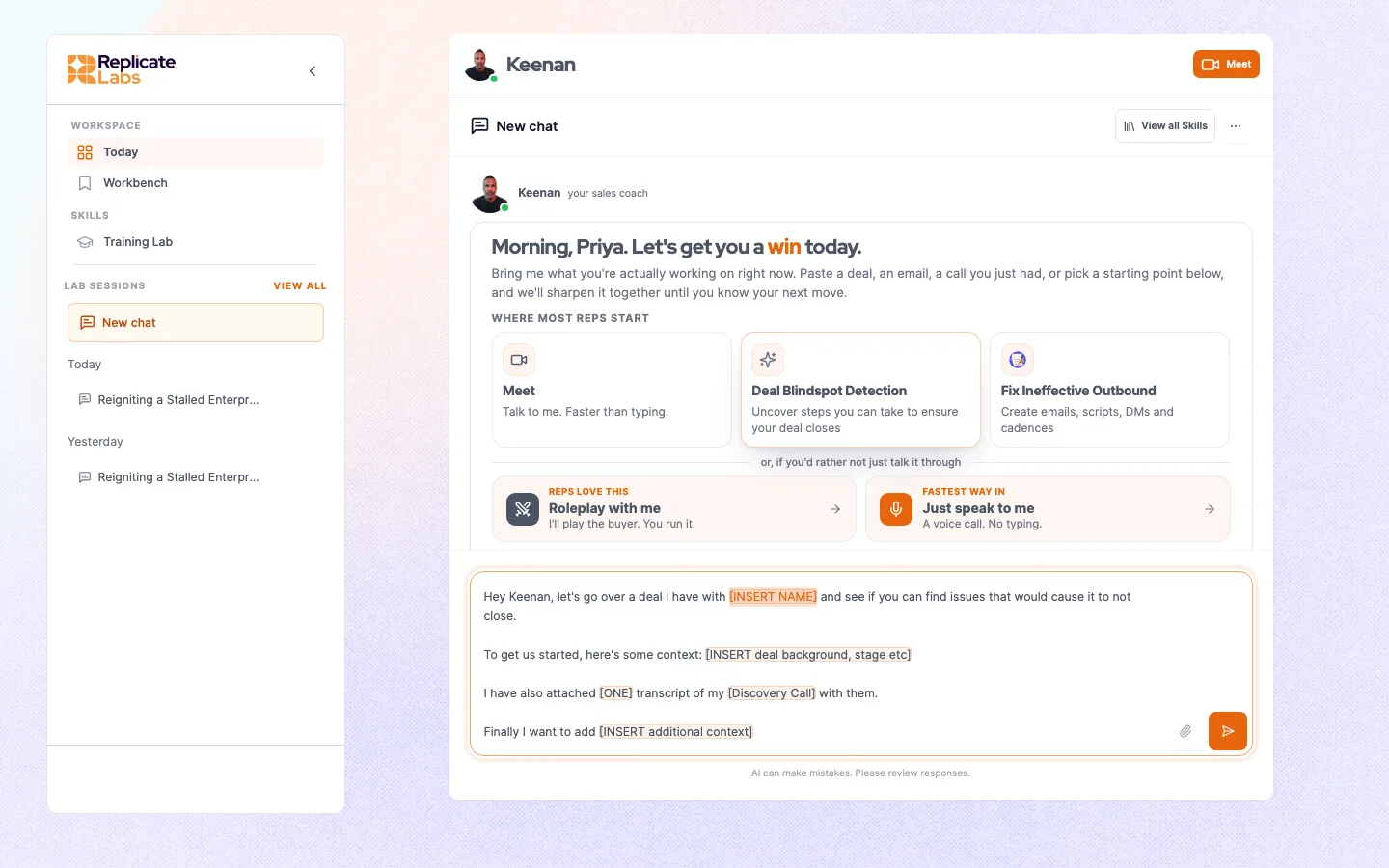
Drops in textPuts a prompt template into the composer with the placeholders selected for you. It does not send. Replace the placeholders with your real deal before you do.
Three kinds of button. Two of the three fill the composer rather than sending, which is deliberate.
A button that appears to do nothing
If a button that runs a skill is clicked and nothing happens, the usual cause is that the skill is not loaded for your user. It fails silently by design rather than throwing an error at a rep mid-session. It is not something you can fix from the rep surface: report it to your administrator, who can get it corrected. See Troubleshooting.
## Using one properly
1. Click the button that matches what you are doing.
2. The composer fills, usually with placeholders for the account, the stage, and what you want.
3. **Replace every placeholder.** A prompt sent with the placeholders still in it produces exactly the generic answer people then complain about.
4. Send, then talk to the coach normally. The button is a starting point, not a form.
A button that drops in text. The template lands in the composer with its placeholders selected, and it does not send. Replace every placeholder with your real deal before you do.
## Why the row changes
Three things decide which buttons you see.
- **The coach you are on.** Buttons belong to a coach. Switch coach and the row changes.
- **Your active role.** Rep, manager and admin surfaces each have their own row. A manager on the rep coach sees rep buttons.
- **Your account.** Some buttons are scoped to specific companies, and some appear only in particular states, for example only until you have had your first conversation.
## Getting one added
Buttons are part of coach configuration rather than something a customer administrator edits directly. If your team does the same job every week and there is no button for it, that is worth raising: it usually becomes either a button or a [skill](/docs/coaching/skills). See [Coach configuration](/docs/admin/coach-configuration).
---
# What your coach remembers
Section: Coaching
Source: https://replicatelabs.ai/docs/coaching/memory
How deal memory works, who else it reaches, and what to do when the coach is carrying something wrong.
The coach carries what you have told it. This is what separates it from opening a general assistant every morning, and it is why the value compounds instead of resetting.
## What carries over
The accounts you have discussed, what the buyers said, what you committed to do, where the coach thought the risk was, and whether you came back and closed the gap.
Say an account name a week later and you do not re-explain it. The coach picks up where you left it, and it will usually open by asking about the thing it told you to go and find out.
## Whose memory it is
Memory is scoped to **you**. Your coach's memory of your work is yours and a colleague cannot reach it by asking the same coach: your coach and Sally's coach are the same coach, and it has no route from her conversation to yours.
Yours, across your coachesMemory follows you, so what you established with one coach is available when you work with another. You do not re-explain an account because you switched.
Not reachable by a colleagueAnother rep asking the same coach about your account gets nothing of yours. Their coach knows their work, not yours.
Visible upward as observationsWhat you work through informs what your manager sees: what you are stuck on, where the risk is, the themes across the team, reported as a read rather than replayed. The exception is a note your coach writes onto a deal, which is stored there and visible to anyone who can see that deal. See What you can see.
Separate from account knowledgeWhat the coach knows about your products, buyers and standards comes from the account knowledge base. That is shared and administered, and it is not your history.
Four boundaries. The third is the one people assume wrongly in both directions: coaching is neither sealed off from your manager nor handed to them verbatim.
## Why the second session is the good one
1Session oneMostly the coach getting the deal into its head. Useful, but it is doing more listening than coaching.
2BetweenYou go and find out the thing it named. Or you do not.
3Session twoIt can now compare what you said with what happened. This is where it starts being worth the time.
The compounding curve. Judging the product on session one is judging it before it has the information it runs on.
It also gets uncomfortable here, in the way a good manager is uncomfortable. If you said you would get the economic buyer on a call and you did not, it will ask why.
## Correcting it
Coaches are not always right about your deal, and they are reasoning from what you told them. Say so plainly in the conversation: "that is wrong, the champion moved teams in July". The correction carries forward like anything else.
Correct as soon as you notice. An uncorrected wrong fact gets reasoned from in every later session, and by the fourth one it is load-bearing.
## When you want it to forget
If you have been working a deal that has died, say so rather than leaving it. "We lost Contoso, they went with the incumbent, do not keep asking about it" is enough, and the reason you give is useful to it later.
A manager or an administrator can also reset your coaching history outright, which clears the conversations and the memory built from them. There is no undo and no partial version of it. See [Users, teams and roles](/docs/admin/users-teams-roles).
---
# Skills
Section: Coaching
Source: https://replicatelabs.ai/docs/coaching/skills
Repeatable jobs built into a coach so the output holds the same standard every time. What they are for, the one design constraint, and why one might not fire.
A skill is a job the coach knows how to do properly, built once and made available across an account.
## The problem they solve
Ask ten reps for a deal review and you get ten formats and eight standards. Ask the same coach ten times through a well-built skill and you get one structure, working your account's methodology and your qualification bar, every time.
Skills are how an organisation encodes "this is how we do this here" into something reps actually use, instead of a template in a shared drive that nobody opens.
## Running one
You invoke a skill either through a [coach button](/docs/coaching/coach-buttons) or by asking for it in the conversation by name. A button pre-fills the composer to invoke it rather than sending straight away, which is your chance to add the specifics before it runs.
Give it everything it needs in that first message. Which brings us to the constraint.
A skill runs in a single pass
A skill takes what it has, does the work, and returns the output. It does not run a multi-turn interview and then produce something at the end. If you invoke one with half the inputs, it will produce a competent answer to a question you did not mean to ask.
Practically: use a skill for the job with a known shape, and have a normal conversation for the thinking. If you find yourself wanting to go back and forth inside a skill, you wanted a conversation.
## What they are typically used for
Deal reviewAn opportunity worked against the account's qualification standard, in a fixed structure a manager can read quickly.
Call preparationA brief for a named upcoming conversation: objectives, questions, likely objections.
Discovery questionsA question set for a specific persona and stage, drawn from the methodology.
Competitive positioningHow to frame against a named competitor, using what the account knows rather than generic battlecards.
Business caseA first draft of the internal case your champion has to make without you in the room.
Building a roleplayTurning a real situation into a practice scenario. See Building roleplays.
Common skills. The exact set is per account, and the names will be your organisation's.
## When a skill does not fire
A skill has to be loaded for your user before it will run. If it is not, a button that invokes it does nothing at all when clicked, with no error message.
This is not something a rep can fix, and it is not a sign the skill is broken for everyone. Report it to your administrator with the button name and the coach you were on. See [Troubleshooting](/docs/reference/troubleshooting).
## Getting one built
Skills are built per account against that organisation's methodology and standards, so they are commissioned rather than self-served. The trigger is simple: if your team does the same job by hand every week, and the quality varies by who did it, that is a skill.
---
# How roleplay works
Section: Roleplay
Source: https://replicatelabs.ai/docs/roleplay/overview
What a roleplay is made of, why the persona decides whether it is worth doing, and where it sits against live deal coaching.
A roleplay is a live spoken practice conversation against a buyer, graded afterwards against your organisation's own standard.
It belongs in the **prepare** part of the week: the call you have on Thursday, rehearsed on Wednesday. It is not a separate training product you visit once a quarter, and it does not replace bringing the live deal to your coach.
## What a roleplay is made of
Every roleplay is a binding of three or four configured objects. Knowing the parts explains why one feels sharp and another feels flat.
PersonaRequired. The buyer: their role, what they respond well to, what makes them defensive, and how much they know about your category. See Personas.
ScorecardRequired. The standard the conversation is graded against, built from your methodology. See Scorecards.
ProductOptional. What is being sold, so the buyer's objections are about your actual offer rather than a generic one.
ScenarioThe situation itself, carried as the buyer's starting sentiment, how that sentiment moves during the conversation, and any specific instructions for the encounter.
The composition. There is no "difficulty" slider. Difficulty is an emergent property of the persona and the sentiment settings, which is why two roleplays at nominally the same level can feel very different.
## Sentiment drift is the thing to understand
A buyer does not hold one attitude for twenty minutes. A roleplay carries both a starting sentiment and a **drift**: which way the buyer moves as the conversation goes on.
That is what makes a rehearsal feel like a real call. A buyer who starts sceptical and warms if you quantify their problem is a different exercise from one who starts polite and cools as you push. Neither is "harder"; they teach different things.
## Why the persona decides everything
The single factor determining whether a roleplay is worth the twenty minutes is who is on the other side of it.
A generic hostile prospect teaches nothing, because nobody sells to a generic hostile prospect. Personas here are built from real material: the buyers your organisation actually meets, the objections that actually land, and where relevant the history of a specific opportunity.
Practising the CFO conversation against a persona built from that CFO's deal is a categorically different exercise from practising against "a difficult CFO".
## How it fits with deal coaching
1Coach the dealWork out what the next conversation has to achieve.
2Rehearse itRun the roleplay against the buyer you are about to meet.
3Read the scoreFind the criterion that let you down.
4Take it backBring the weak criterion to your coach rather than immediately re-running the roleplay.
Then have the real conversation, and bring that back too. The loop is the product; the roleplay on its own is a practice app.
The full loop. Step four is the one teams skip, and it is where the improvement actually happens.
## Deployed roleplays
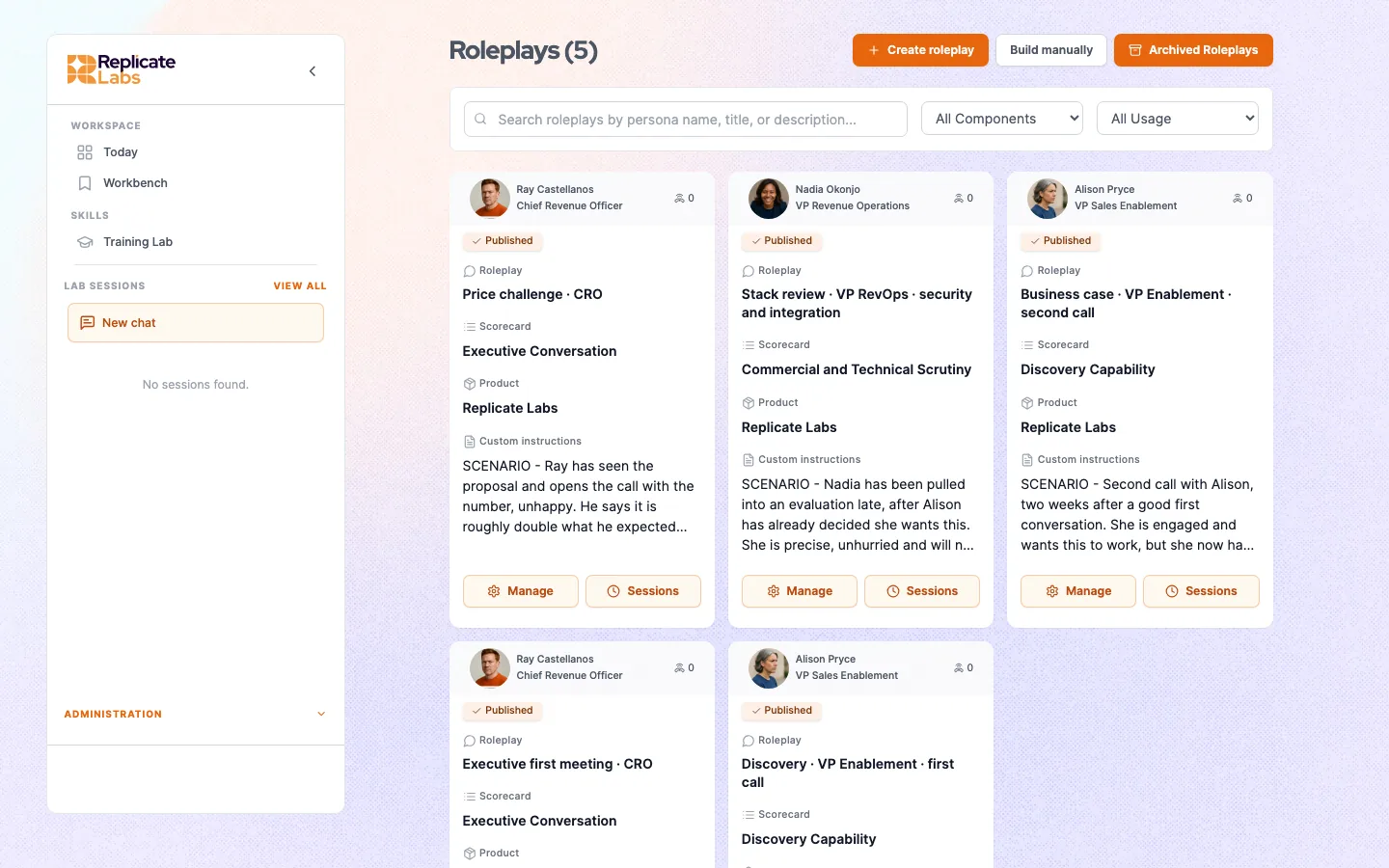
An administrator can publish a roleplay across a team, which is how an organisation runs everyone through the same scenario and gets comparable results. If a roleplay appears in your list that you did not choose, that is why.
Comparable is the operative word: results are only comparable while the scorecard behind them is unchanged. See [Reading your score](/docs/roleplay/reading-your-score).
---
# Running a roleplay
Section: Roleplay
Source: https://replicatelabs.ai/docs/roleplay/running-one
Getting into the Training Lab, what happens during the call, and the four mistakes that make a roleplay worthless.
## Getting to it
The Training Lab lists what is configured for the coach you are currently on. The platform remembers your last coach selection between sessions, so if the scenarios look unfamiliar, check the coach selector at the top left before assuming something is missing.
## Running it
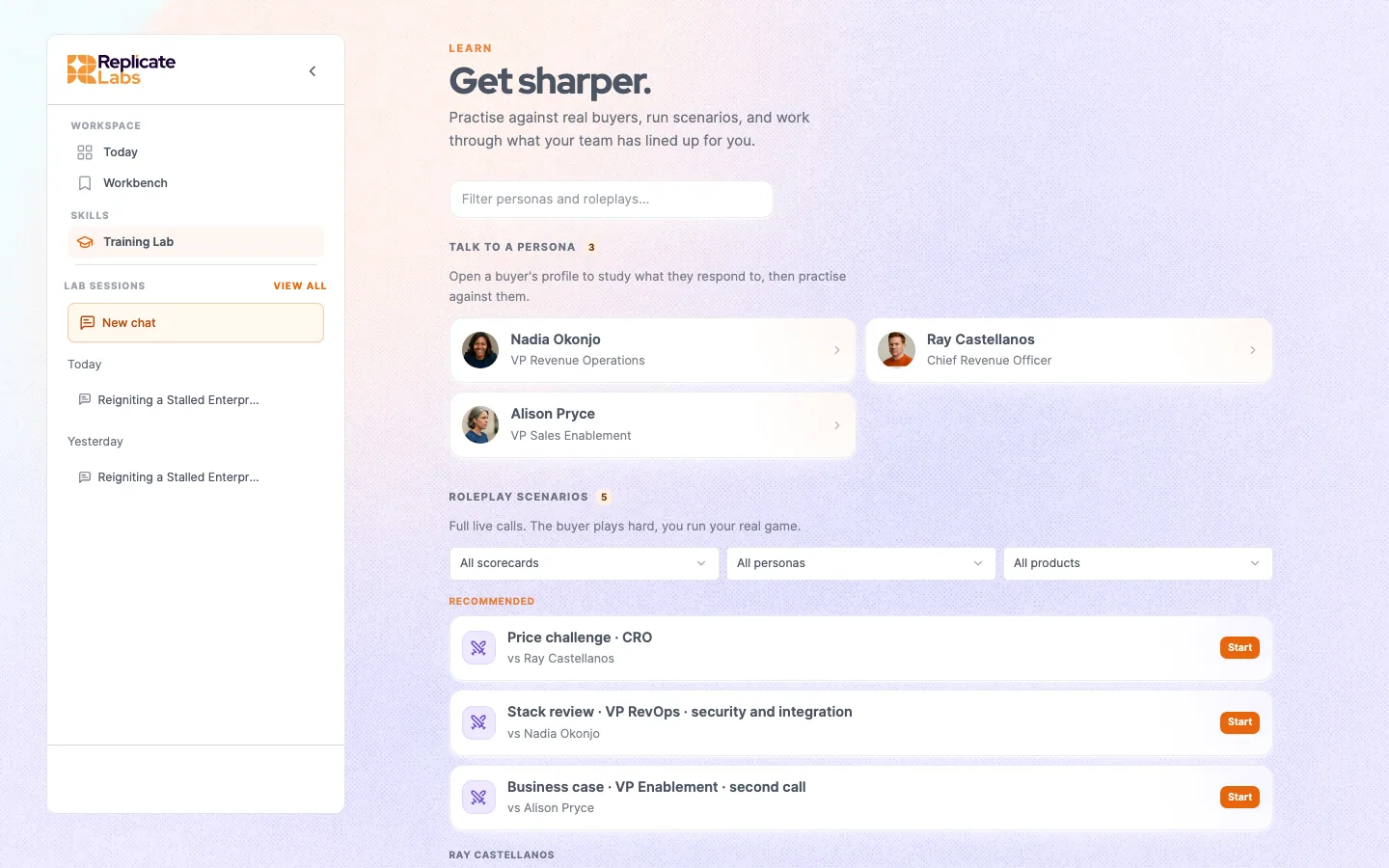
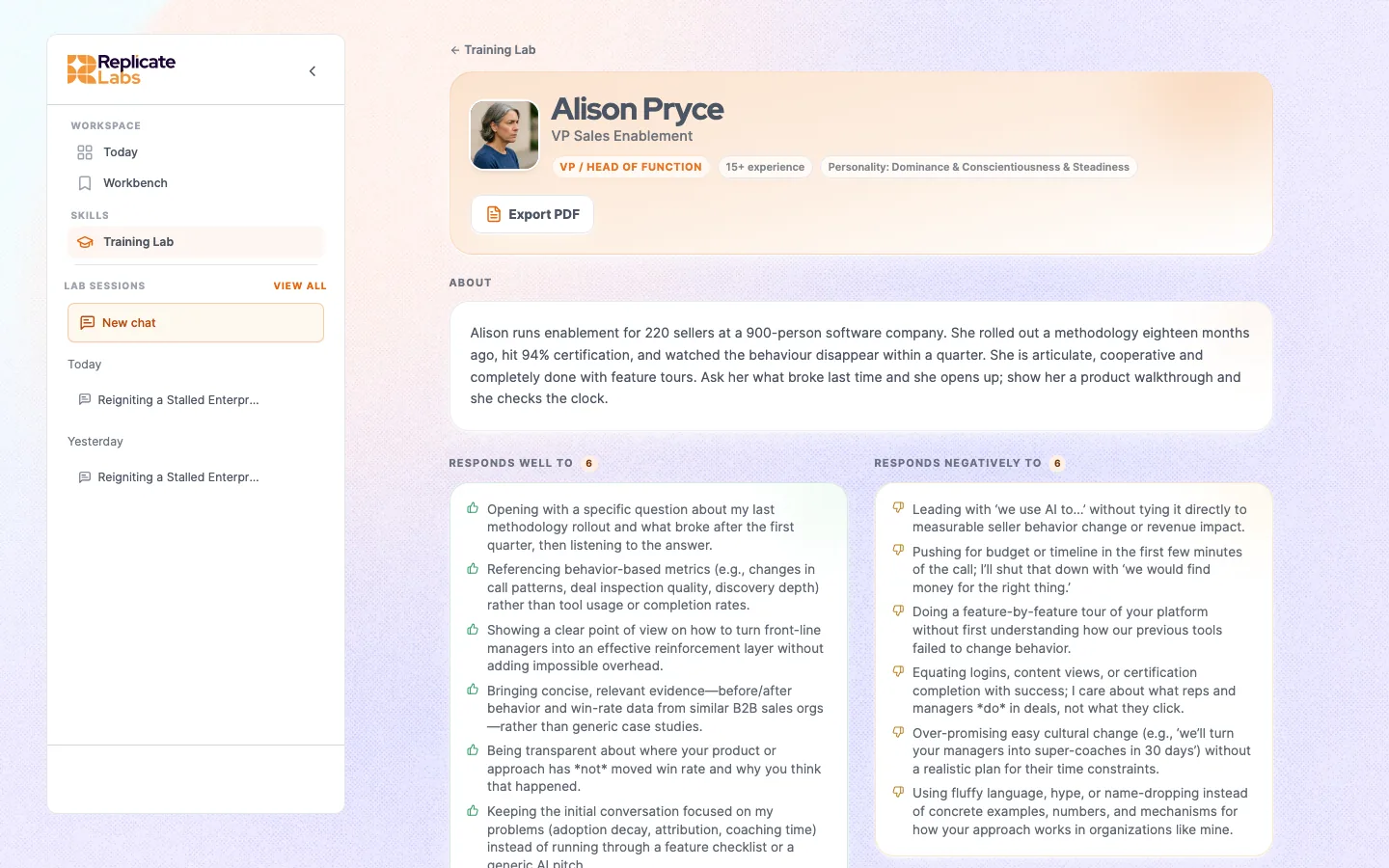
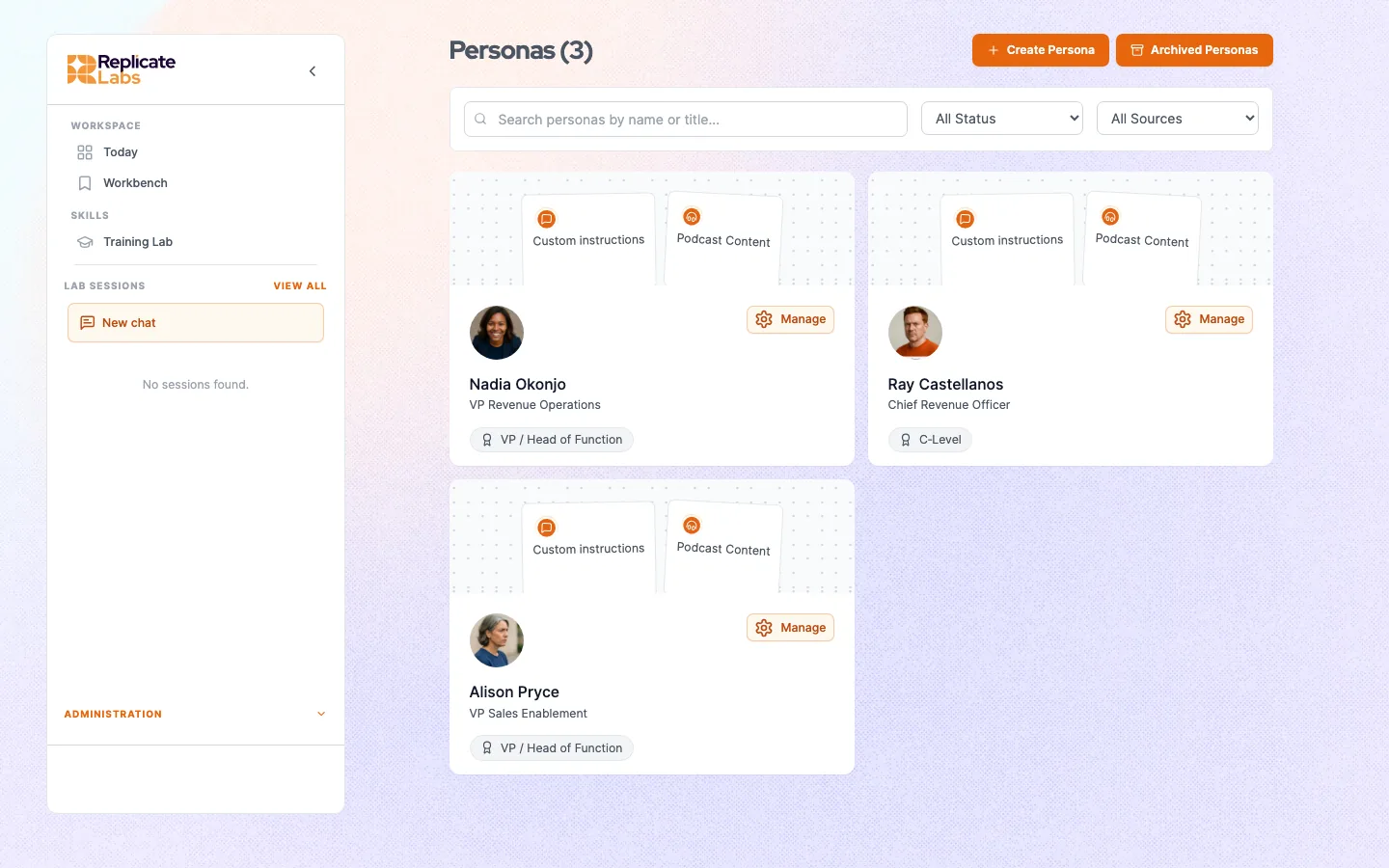
The Training Lab holds two lists: the **personas** on your account, which you can open to study a buyer before you meet them, and the **roleplay scenarios**, which are the conversations you can run. Filters across the top narrow the scenarios by scorecard, persona and product.
The Training Lab. Personas at the top, runnable scenarios below, filtered by scorecard, persona and product. Each scenario names the buyer it puts you in front of.
1Pick the roleplayThe scenario. Choose the one matching a conversation you are actually about to have.
2Pick the personaWhere the roleplay offers a choice. Pick the buyer you are dreading, not the comfortable one.
3Start the callGrant microphone access. The buyer comes up on camera and opens.
4Run it properlyTreat it as the real call. Twelve to twenty minutes.
Five steps. Step four is where almost all of the value and all of the failure modes live.
## The four ways to waste a roleplay
Half doing it
Running four minutes to "see what it is like" produces a score computed from four minutes of evidence. It will look bad, and it will not mean anything. Either run it properly or do not run it.
Practising the comfortable conversation
Rehearsing the champion call before a first meeting with a CFO is pleasant and useless. Pick the one you are avoiding.
Playing to the rubric
If you know the scorecard rewards confirming impact, you can say the words without meaning them and score well. You will have trained yourself to pass a roleplay.
Re-running immediately
Running it again straight away tends to rehearse the same mistake more fluently. Take the weak criterion to your coach first, then re-run.
## What the buyer will do to you
A well-built persona is cooperative enough that the conversation goes somewhere and difficult enough to be worth doing. Expect it to:
- give you a vague answer to a vague question, exactly as a real buyer does
- change the subject when you get near something it does not want to discuss
- withhold a number until you have earned it
- warm up or cool down as the conversation goes on, depending on how you handle it
If you ask a lazy question you get a lazy answer. That is the design, not a limitation.
## Ending it
End the call deliberately rather than closing the tab. The grading runs off the completed conversation, and an abandoned session is not the same thing as a finished one.
## If the buyer will not start
Same cause as a coach call that will not start: microphone permission, and it fails quietly. See [Troubleshooting](/docs/reference/troubleshooting).
---
# Personas
Section: Roleplay
Source: https://replicatelabs.ai/docs/roleplay/personas
What a persona is configured from, how those settings show up in the conversation, and what makes one worth practising against.
A persona is the buyer in a roleplay. It is a configured object, not a prompt someone wrote once, and the fields it carries map directly onto behaviour you will feel in the conversation.
## What a persona is made of
Role and titleWho they are and what they are accountable for. Sets what they care about and what they will happily ignore.
PersonalityHow they behave in a conversation. Brisk, sceptical, discursive, deferential. This is the texture you notice in the first thirty seconds.
Responds well toWhat opens them up. Specific numbers, peer examples, being asked about their own targets, brevity.
Responds badly toWhat closes them down. Feature lists, being sold to before being understood, jargon, an early price conversation.
Industry knowledgeHow much they already know about your category. A buyer who has evaluated three vendors behaves nothing like one who has never considered the problem, and this is the field that decides which you get.
Persona fields. "Responds well" and "responds badly" are the two doing most of the work in a live conversation.
## Where the material comes from
Personas are configured per account, because a persona who is not recognisably your buyer wastes the rep's time.
Good ones are built from things the organisation already has: the titles you actually sell to, the objections that keep coming back, the incumbent you keep displacing, the reasons deals in your business genuinely die, and where relevant a specific live opportunity's own history.
That last case is the strongest. A persona carrying a real deal's history knows what was said on the last call, which turns a rehearsal from theoretical into specific.
## Study the buyer before you practise
The Training Lab lists the personas on your account separately from the roleplay scenarios, and you can open one to read their profile: what they are accountable for, what opens them up, what shuts them down, and the topics they are currently preoccupied with.
A persona profile. What they are accountable for, what opens them up and what shuts them down, before you ever speak to them.
Doing this before you run a scenario for the first time is worth the three minutes. Most reps who feel a roleplay went badly went in without knowing who they were talking to, which is not a mistake they would make before a real meeting.
## Choosing one
Pick the persona for the conversation you are about to have, not the one that will go well.
Useful
"I have a first meeting with a finance director who has already told my champion the timing is wrong."
Comfortable
"I will practise against the enthusiastic champion again because I did well last time."
## Personas have faces
A persona can carry an avatar, so it comes up on camera as a person rather than a name. This matters more than it sounds: rehearsing eye contact and reading a face are part of the conversation you are practising for.
## Getting one added or changed
Personas are part of account configuration. If your team is meeting a buyer that no persona covers, or an existing one behaves in a way your real buyers do not, that is a configuration request rather than something changed from the rep surface.
Give your administrator the specifics: the title, what actually opens them up, what shuts them down, and a real objection in the buyer's own words. Those map straight onto the fields above. See [Building roleplays](/docs/admin/roleplay-config).
---
# Scorecards
Section: Roleplay
Source: https://replicatelabs.ai/docs/roleplay/scorecards
How a conversation is graded: items, levels, and feedback instructions, and why a scorecard edit resets your history.
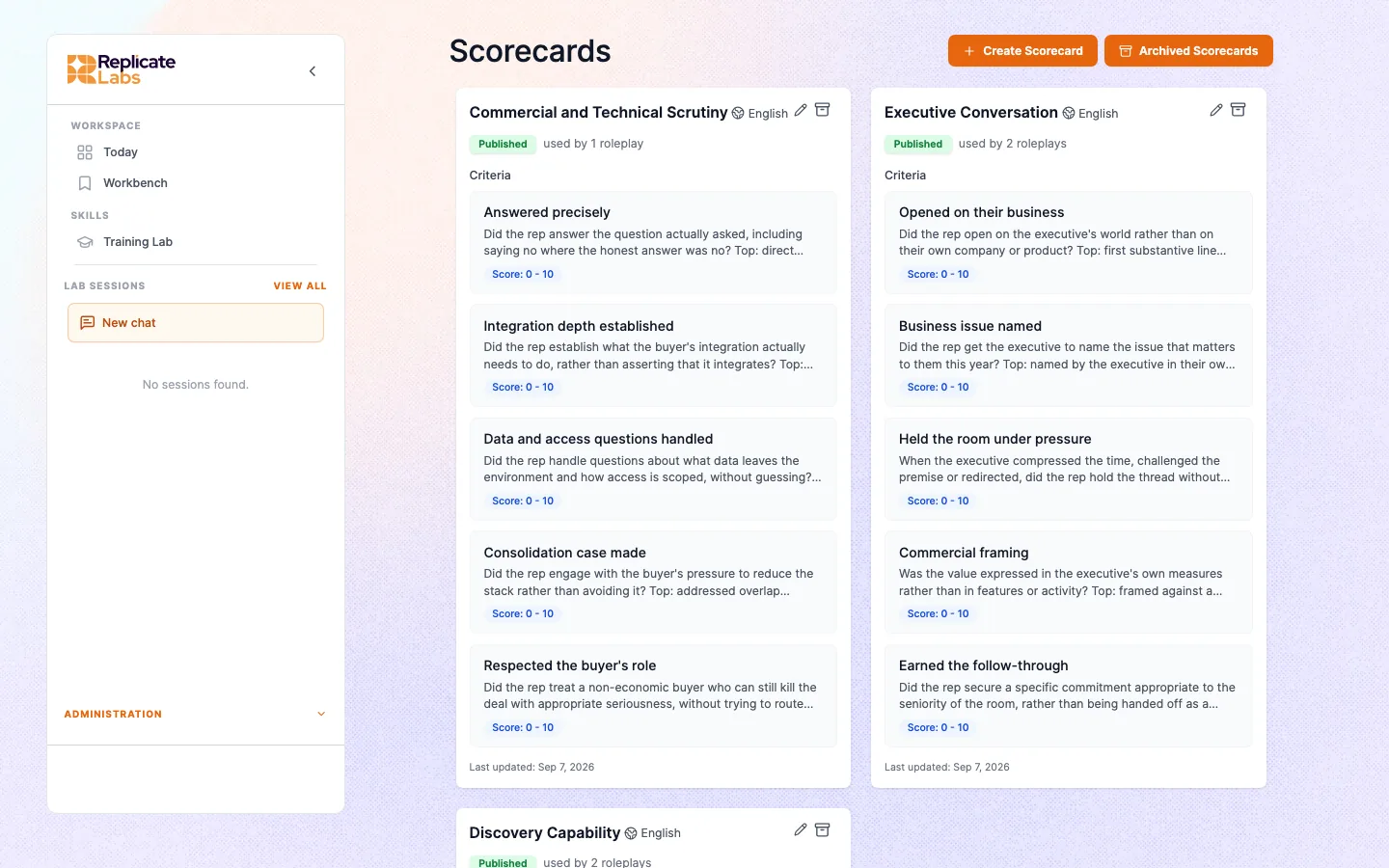
A scorecard is the standard a conversation is graded against. It is built per account from that organisation's own methodology and qualification bar, so a grade means something specific rather than "the model liked it".
## The structure
ItemOne capability being assessed. "Quantified the buyer's problem", "confirmed the decision process", "handled the price objection without discounting". A scorecard is a set of these.
LevelsUnder each item, what each grade actually looks like, described as observable behaviour rather than adjectives. This is what makes grading repeatable rather than a vibe.
Feedback instructionWhat the rep should be told when they land at a given level. This is why the feedback reads like your organisation's coaching rather than generic advice.
Item, levels, feedback. The levels are the part that has to be behavioural. "Good discovery" is not gradeable; "asked for a number and got one" is.
## Why it is not a generic sales rubric
The items reflect how your organisation sells. A team on a problem-centred methodology is graded on whether the problem was quantified and its impact confirmed. A team on a value-centred framework is graded on the business issue and who owns it. Same conversation, different scorecard, legitimately different grades.
That is the point. A scorecard that graded every methodology the same way would be measuring generic conversational competence, which nobody's number depends on.
## Comparability
A scorecard edit is a new baseline
Scores are only comparable while the scorecard behind them is unchanged. If items or levels are edited, earlier grades were produced against a different standard, and plotting them on one chart is misleading, however tempting the line looks.
There is no offset that repairs this. Treat an edit as starting a new baseline, and say so on any report that spans the change.
This matters most during the first few months, which is exactly when a scorecard is most likely to be tuned. If you are going to change it, change it early and then leave it alone.
## Who sees your scores
You, and the managers of the teams you are in. Managers can also read the roleplay conversation itself, not only the grade. See [What you can see](/docs/managers/what-you-can-see).
## Building or changing one
Scorecards are configured per account. See [Building scorecards](/docs/admin/scorecard-config) for what makes a good item and the traps to avoid.
---
# Reading your score
Section: Roleplay
Source: https://replicatelabs.ai/docs/roleplay/reading-your-score
What to take from a graded roleplay, what to ignore, and how to turn a weak criterion into an actual improvement.
After a roleplay you get a graded read: a score, a breakdown by criterion, and feedback pointing at moments in the conversation.
The number is the least useful part of it.
## Three habits
Read the evidenceA criterion marked down with a quoted exchange is a coachable thing. The overall figure is not. Go to the quotes first and the total last, or ideally not at all.
Look for the repeatOne weak criterion in one roleplay is noise. The same criterion weak across four is a skill gap worth an hour. Judge yourself on the pattern, not the session.
Do not chase the numberPlaying to the rubric produces someone who is good at roleplays. Work the criterion, not the score.
How to read a graded conversation. The score exists to point you at the criteria; it is a signpost, not the destination.
## Turning a weak criterion into something useful
The most valuable twenty minutes after a roleplay is not another roleplay. It is a conversation with your coach about the specific thing that let you down.
1Name it preciselyNot "my discovery was weak". "I was marked down on confirming impact."
2Take the quoteBring the actual exchange the grader flagged. "Here is what I said. Show me what it should have sounded like."
3Get the wordsAsk for the two or three questions you should have asked, phrased the way you would say them.
4Re-runNow the second attempt is practising something different rather than the same thing more fluently.
Score to improvement. Without step two the conversation stays abstract and nothing changes.
## A low score that is not about you
Three cases worth recognising before you take it personally.
- **You ran four minutes.** The grader had four minutes of evidence. It is not a read on your ability.
- **The scorecard was edited between attempts.** You are being graded against a different standard. See [Scorecards](/docs/roleplay/scorecards).
- **You practised the wrong scenario.** If the roleplay's scorecard grades a discovery conversation and you ran it as a negotiation, the criteria will mark you down for not doing something you were never trying to do.
## What a good trajectory looks like
Not a rising line. What you want is a **narrowing spread**: your weakest criterion coming up towards the rest, and the same criterion no longer being the weak one three sessions later.
A rising average with the same criterion at the bottom every time means you are getting better at the things you were already good at.
---
# The manager coach
Section: For managers
Source: https://replicatelabs.ai/docs/managers/manager-coach
A separate coach for people running a team: what to ask it, how it differs from the rep coach, and where it gets its answers.
Managers get their own coach. It is a different coach, not the rep coach with a manager badge, and it reasons about a team rather than an opportunity.
If your account has one, you reach it through the coach selector, and it carries its own button row aimed at management work.
## What it is for
Team snapshotWhere the team is, who is engaging, what is trending. The starting point for a week.
One repA read on an individual: what their pattern is and what the next coaching conversation should be about.
Coverage riskWhere the exposure is. Which deals are thinner than the forecast implies, which reps are carrying a gap nobody has named.
Three standing questions. Most manager sessions are a variant of one of them.The manager surface. The buttons change with your active role, so a manager gets deal review, pipeline risk and one-to-one preparation rather than the rep set.
## Ask, do not read
You do not open a dashboard and interpret it. You ask a question and get an answer grounded in what the team has actually been doing.
Questions that work:
- "Who on my team needs an hour this week, and what should that hour be about?"
- "What is the pattern across the deals we lost last quarter?"
- "Prepare me for a conversation with a rep who keeps qualifying on the champion's word alone."
- "Which of these opportunities is thinner than the rep thinks?"
- "We have had three deals stall at the same stage. Is that a person problem or a stage problem?"
The last one is the shape of question that dashboards cannot answer and a manager coach can.
## Where its answers come from
Team engagementWho is using their coach and who has gone quiet.
Roleplays and callsGraded results against the account scorecard, and the conversations themselves, per rep and across the team.
Account knowledgeYour organisation's methodology and standards, so its management advice is in your language.
Coaching conversations, as observationsWhat your reps are working through with their coaches, summarised into themes, risks and key points rather than handed over as a transcript. See What you can see.
Four inputs. The third is the one that surprises people: coaching conversations do inform what you see, as a read rather than a record.
## Preparing a one to one
The strongest single use is the fifteen minutes before a one to one. Ask what to raise, ask for the evidence, and ask how to open it so the conversation is about the capability rather than the number.
Then have the conversation yourself. See [The coaching conversation](/docs/managers/coaching-conversation).
## What it will not hand over
Ask what a rep is stuck on and you get a straight answer. Ask for the coaching conversation itself and that is not the shape of what comes back: the coach reports, it does not replay. See [What you can see](/docs/managers/what-you-can-see) for where that line sits and why.
## Early accounts
A team that started last week has not generated enough signal to read patterns from, and asking for patterns anyway produces confident nonsense. Give it a few weeks of real use before you draw conclusions across a team, and treat the first month's reads as anecdotes.
---
# What you can see
Section: For managers
Source: https://replicatelabs.ai/docs/managers/what-you-can-see
Exactly what reaches a manager: the records you get in full, the coaching that reaches you as observations rather than a transcript, and how to answer a rep who asks.
This page exists so you can answer the question a rep will ask in week one, accurately, without guessing.
## The model: it works like a reporting line
The platform is built to behave the way a management hierarchy already behaves, and it is a deliberate design decision.
You sit down with a rep. They tell you a lot: some of it about the deal, some of it tangential, some of it half-formed, some of it wrong. Then you meet your own boss, and they ask how that rep is doing. You answer the question they actually asked, in the terms they care about. You do not read out a transcript of the conversation.
Your coach does the same thing with your reps' coaching conversations.
1The rep works with their coachDeals, call preparation, what they are stuck on, the things they would only say to someone who is not marking them.
2You ask a questionWhat is the team stuck on, where is the pipeline risk, who needs an hour this week.
3You get the answer, not the recordingSummary, key points and observations, framed for what a manager needs to act on.
The reporting line. The substance travels upward. The record of exactly what someone said does not.
## What you get as a record
These you can reach in full, per rep and across your teams.
Roleplay transcriptsThe full practice conversation, not only the grade.
Call transcriptsReal calls that have been brought onto the platform.
Scorecards and resultsGraded results against your account's standard, per criterion, per rep and across the team.
EngagementWho is using their coach, who has gone quiet, who never started.
Records available to managers and administrators. Administrators reach these across the whole company; a manager reaches the teams they manage.
## What you get as observations
Coaching conversations, the chat and calls a rep has with their coach, are not presented to you as a record. Their substance reaches you through the coach as **summary, key points and observations**, in the terms a manager, enabler, leader or operations person needs, and the product surfaces (analytics, reporting, the API) expose summaries rather than raw sessions.
So these are all fair questions and the coach will answer them:
- "What is the team stuck on this month?"
- "Where is the pipeline risk nobody has put in the forecast?"
- "What are the common objections coming up in coaching?"
- "Who needs an hour this week, and what should it be about?"
Reporting across the account draws on the same material.
Be precise about what this is
Coaching conversations are not hidden from you, and the boundary is a behavioural one rather than a wall. Your coach is instructed to give you the read rather than the recording, and every product surface is built to summarise. The underlying sessions are within reach of the manager coach, so treat "no transcripts" as how the system is designed to behave, not as something it is incapable of.
If your organisation needs that guaranteed rather than intended, say so. It is a product change, and it is a reasonable thing to ask for.
## Coach notes on deals
One thing does cross into the record, and it is worth knowing because it is the exception to everything above.
When a rep works a deal with their coach, the coach can write a note onto that deal. The note is the coach's account of what the rep shared, it can be close to their words, and it is stored on the deal and shown in the deal's timeline. Anyone who can see the deal sees the note: managers for their teams' deals, administrators across the company.
So the accurate line for a rep is that the coaching conversation is not filed, but a deal note written out of it is.
## Why it is built this way
A rep who believes every word is being filed brings a tidied version of the deal, and a tidied deal cannot be coached. You would end up managing a rep's summary of their own problems, which is the thing you already have and the reason coaching is hard.
The reporting line handles this the same way a good manager does. Your rep tells you the messy version because they trust you to pass on what matters and leave the rest. That trust is what makes the messy version available at all, and it is worth protecting deliberately rather than by accident.
## Answering the question honestly
When a rep asks, the true answer is short and it is better than a vague one:
> Your roleplays, your call transcripts and your scores, I can see. What you talk through with your coach comes to me as what you are working on and where you are stuck. I am not sent transcripts of your sessions, and if you tell your coach something that belongs on a deal, it can end up as a note on that deal.
Say it in week one. A rep who has been told the real shape stops guessing, and guessing always lands somewhere more suspicious than the truth.
## Two traps
**Ranking reps by score.** The number moves with which roleplay they ran and which version of the scorecard graded it. A league table built on it will be confidently wrong and will teach your team to run the easy scenario.
**Reading a quiet week as disengagement.** A rep in a heavy delivery week uses it less. Look at the month, and at whether the deals moved.
## Administrators
An administrator reaches the same records across the whole company, plus configuration.
**Resetting a user's coaching history** clears it irreversibly, and it is available to administrators **and to managers, for users on their teams**. It deletes the conversations, the chats and the memory built from them. See [Users, teams and roles](/docs/admin/users-teams-roles).
---
# The coaching conversation
Section: For managers
Source: https://replicatelabs.ai/docs/managers/coaching-conversation
Using the platform to make your one to ones better rather than to replace them, and what to do with a rep who is not using it.
The platform does not replace the coaching conversation with your reps. It changes what you spend it on.
Without it, most of a one to one is spent finding out what happened. With it, you arrive already knowing where the capability gap is, and the hour goes on the gap.
## Before
Fifteen minutes with the [manager coach](/docs/managers/manager-coach).
1What is the patternAsk for this rep's recurring weak criterion.
2What is the evidenceGet the specific graded moments you can point at, so the conversation is about observable behaviour.
3How do I open itAsk for an opening that makes it about the capability, not the number. This is the part managers most often get wrong unaided.
Fifteen minutes of preparation. The output is one gap, one piece of evidence, and one opening line.
## During
Bring one gap, not five. A rep who leaves with one thing to work on changes it; a rep who leaves with five changes none of them.
Point at the evidence rather than characterising them. "On three of your last four rehearsals you moved to the solution before you had a number for the problem" is a different conversation from "your discovery needs work", even though both are the same finding.
Tell them the real shape, once
Do not tell a rep their coaching sessions are unreadable, because that is not true and it will not survive contact. Tell them what is: you see their roleplays, their call transcripts and their scores, and what they work through with their coach reaches you as what they are working on rather than as a transcript.
Say it in the first of these conversations. A rep who is quietly guessing at the answer always guesses somewhere worse than the truth.
## After
Give the rep something specific to take back to their own coach. "Go and ask your coach to show you what quantifying impact sounds like on the Contoso deal, and bring me what it gave you" is actionable in a way that "work on your discovery" is not.
It also does something useful structurally: it puts your coaching and their coach on the same thread, so the next session picks up where your conversation ended.
## The rep who is not using it
Almost always one of three causes, and they need different responses.
Never started properly
Opened it once with nothing real in hand, got a generic answer, concluded it was generic. The fix is to sit with them for one session on a real deal of theirs. It is fifteen minutes and it usually settles it permanently.
Thinks you are reading it
The fix is the paragraph above, said explicitly.
Genuinely does not need it this week
A rep in a heavy delivery stretch is not a problem. Look at the month and at whether their deals are moving, rather than at a weekly usage line.
Something is broken for them
A dead button, a call that will not start, a roleplay they cannot reach. All fail quietly. Ask before you assume reluctance. See Troubleshooting.
---
# Rolling out to a team
Section: For managers
Source: https://replicatelabs.ai/docs/managers/rollout
Getting a team from provisioned to genuinely using it, and the checkpoints that predict whether it will stick.
Provisioning a team is not a rollout. This page is what happens after the accounts exist.
## The thing that decides it
Whether each person does one meaningful piece of real work in the first three days.
Not a training session, not a walkthrough, not a demo. One rep, one live deal that is genuinely stuck, one conversation with their coach. People who do that keep going. People who have not opened it by day three usually never do.
Check on day three, not week four
By week four the answer is already decided and the recoverable moment has passed. A five minute check on day three, per person, is the highest-return management action in the whole rollout.
## A rollout that works
1Before launchConfirm the knowledge base has your products and buyers in it, and that at least one roleplay matches a conversation the team actually has. An empty account argues against the product.
2LaunchThirty minutes, not two hours. Say what it is, say plainly what you can and cannot see, and have everyone bring one real deal.
3Day threePer person. Anyone who has not started gets fifteen minutes with you on one of their own deals.
4Week twoUse it in a one to one. Once your reps see it in the management rhythm, it stops being optional.
Four checkpoints. Step one is the one that gets skipped and the one that causes the most damage.
## What to say at launch
Three things, in this order.
1. **What you can and cannot see.** Be specific, because a vague answer here is worse than a blunt one. You see roleplays, call transcripts and scores. What they work through with their coach reaches you as what they are stuck on, not as a transcript. See [What you can see](/docs/managers/what-you-can-see).
2. **Bring a real deal.** Not a demo scenario. The one keeping you up.
3. **This is not a practice tool.** If the team hears "roleplay app", they will treat it as training and it will die as training. It is for the deals they are running this week.
Skip the feature tour. Nobody retains it, and the button row is self-explanatory once someone has a reason to click.
## What not to do
Mandate a usage number
"Three sessions a week" produces three sessions a week of nothing. You will hit the metric and change no behaviour, and you will have taught the team that this is a compliance exercise.
Launch into an empty account
A coach that does not know your products and a practice list with no relevant scenario makes a first impression you will spend a quarter undoing.
## What to measure
Not logins. Ask two questions at the end of the first month.
- **Is the same weak criterion still the weakest?** Across the team, that is the honest read on whether coaching is changing anything.
- **Are the deals people brought in week one further along?** That is the one that matters to your number.
---
# Users, teams and roles
Section: Administration
Source: https://replicatelabs.ai/docs/admin/users-teams-roles
The access model: how roles compose, what team membership changes, and how seats and offboarding work.
## The model
CompanyThe account. Carries a seat limit, the knowledge base, and the configured personas, products, scorecards and roleplays.
UserOne named human. Holds a list of roles, not a single role.
TeamA group of users. Membership carries its own role, so someone can be a plain user in the account and a manager of one team.
TagA cross-cutting label used to scope things, most usefully knowledge, to a set of users who are not a team.
Four objects. The list-of-roles design is the one that surprises people, and it is what avoids duplicate logins.
## Roles
`roles` is a list drawn from `admin`, `manager` and `user`.
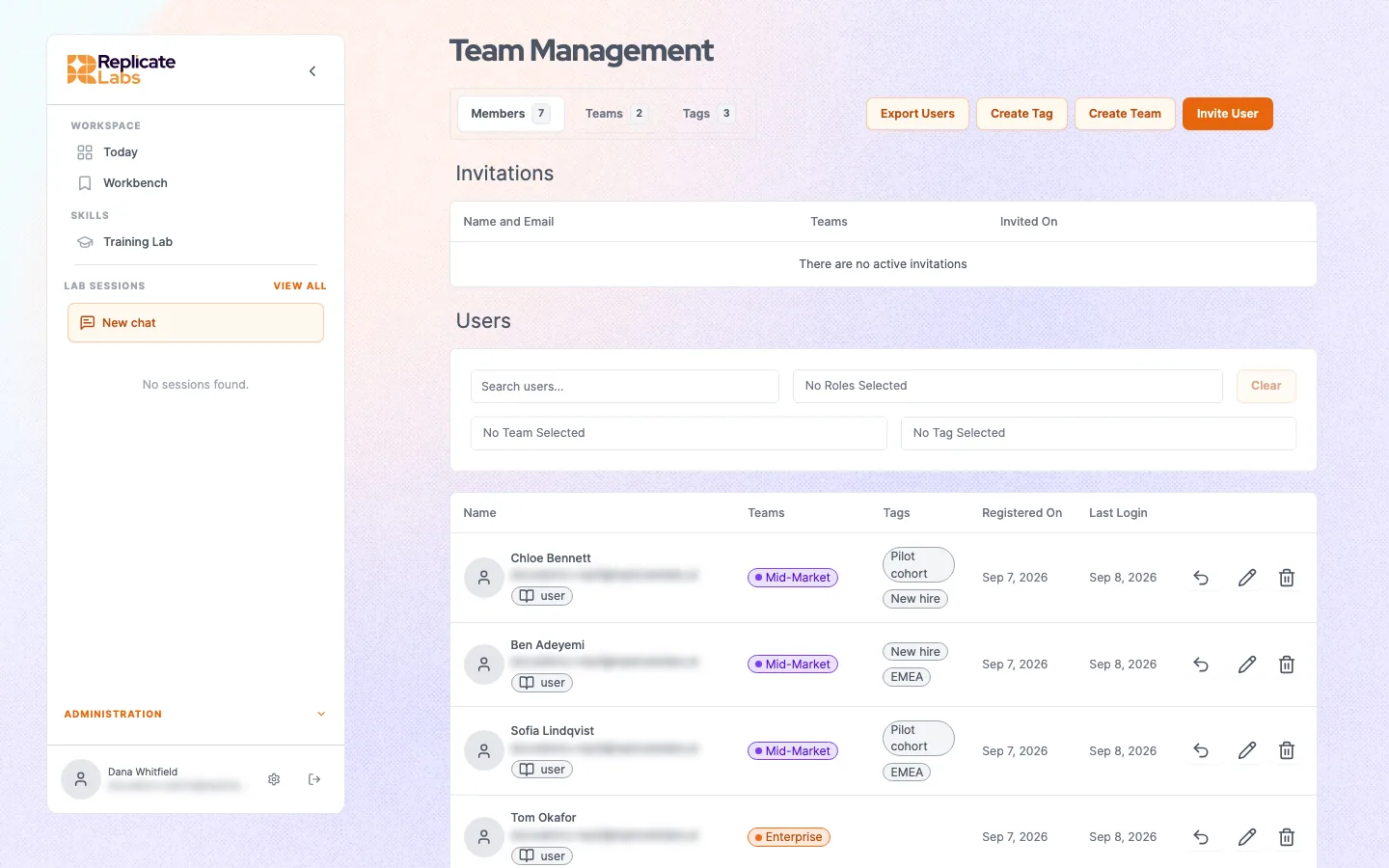
Team management. Each user carries their teams, their tags and a list of roles. Email addresses are obscured here.
| Role | Grants |
| --- | --- |
| `user` | The rep surface: their coach, their conversations, their roleplays, their own scores. |
| `manager` | The manager surface as well: the manager coach and visibility of teams they manage. |
| `admin` | Configuration as well: users, teams, knowledge base, personas, products, scorecards, roleplays. |
Because it is a list, a sales leader who carries their own deals holds `user` and `manager` on one login and switches surface. Do not create a second account for this; you will pay for two seats and split their history across both.
Do not give admin by default
Admin genuinely widens what someone can reach: records across the whole company rather than their own teams, plus every configuration surface. Grant it because a person configures the account, not so they can "see everything". A manager already sees their own teams' records without it.
## Teams
Teams do three jobs.
- **Manager visibility.** A manager sees the teams they manage.
- **Knowledge scoping.** A document can be scoped to a team rather than the whole company. See [What your coach knows](/docs/admin/knowledge-base).
- **Deployment.** A roleplay can be published to a team so everyone runs the same scenario and the results are comparable.
Team membership carries its own role, which is how a player-coach works: `user` at company level, `manager` on their own team.
An empty team is a silent failure
A team with no members reports nothing and receives nothing published to it, and neither state produces an error anywhere. If a manager tells you their team view is empty, check the membership before you check anything else.
## Seats
A company carries a seat limit. A seat is one named human, and sharing one is not supported. A limit of zero means unlimited.
If you cannot add a user and nothing explains why, the seat limit is the first thing to check.
## Offboarding
Two levels, and they are different.
- **Deactivate.** The user can no longer sign in. Their history remains, which is what you want when someone changes role or goes on leave.
- **Delete.** Removing a user or an account outright, for an erasure request, is handled as a request to us rather than from inside the product. Deactivation is the in-product action.
- **Reset coaching history.** Clears a user's conversations, chats and the memory built from them, leaving the account intact. Available to administrators and to managers for users on their teams. Useful when someone changes territory and wants a clean start, and destructive if used casually: the coach loses everything it had learned about that person's deals, which is most of its value to them. There is no undo.
Deactivation is reversible and a reset is not, so deactivate first unless you have specifically been asked to erase. See [Data, retention and deletion](/docs/security/data).
---
# What your coach knows
Section: Administration
Source: https://replicatelabs.ai/docs/admin/knowledge-base
Loading your organisation's material into the coach: scopes, accepted file types, size limits, and the formats that quietly fail to index.
The knowledge base is what the coach knows about your business as opposed to about selling. Products, buyers, competitors, pricing structure, qualification standards, your methodology documents.
It is the difference between a coach that gives good generic advice and one that gives advice about your deal.
## Scope
Every document is uploaded with a scope, and the scope decides who it reaches.
CompanyEveryone on the account. Products, methodology, qualification bar, competitor positioning.
TeamOne team. Territory context, a segment-specific playbook, a product line only that team sells.
TagA labelled set of users who are not a team. Useful for a pilot group or a role that cuts across teams.
Three scopes. Scope at upload time; getting it right is easier than moving it later.
## Accepted file types
| Kind | Extensions | Practical limit |
| --- | --- | --- |
| Documents | `.txt` `.pdf` `.vtt` `.csv` `.md` `.pptx` `.docx` | Around 100MB |
| Media | `.mp3` `.mpga` `.m4a` `.wav` `.mp4` `.mpeg` `.webm` | Around 2GB |
Spreadsheets are **not** an accepted type. If your source is a pricing grid, a competitor comparison or a value matrix in a spreadsheet, export each sheet to Markdown or CSV first.
## Uploading
Select the file, choose the scope, and confirm the upload. Processing then runs asynchronously: the document is indexed in the background and the list shows a status when it is ready.
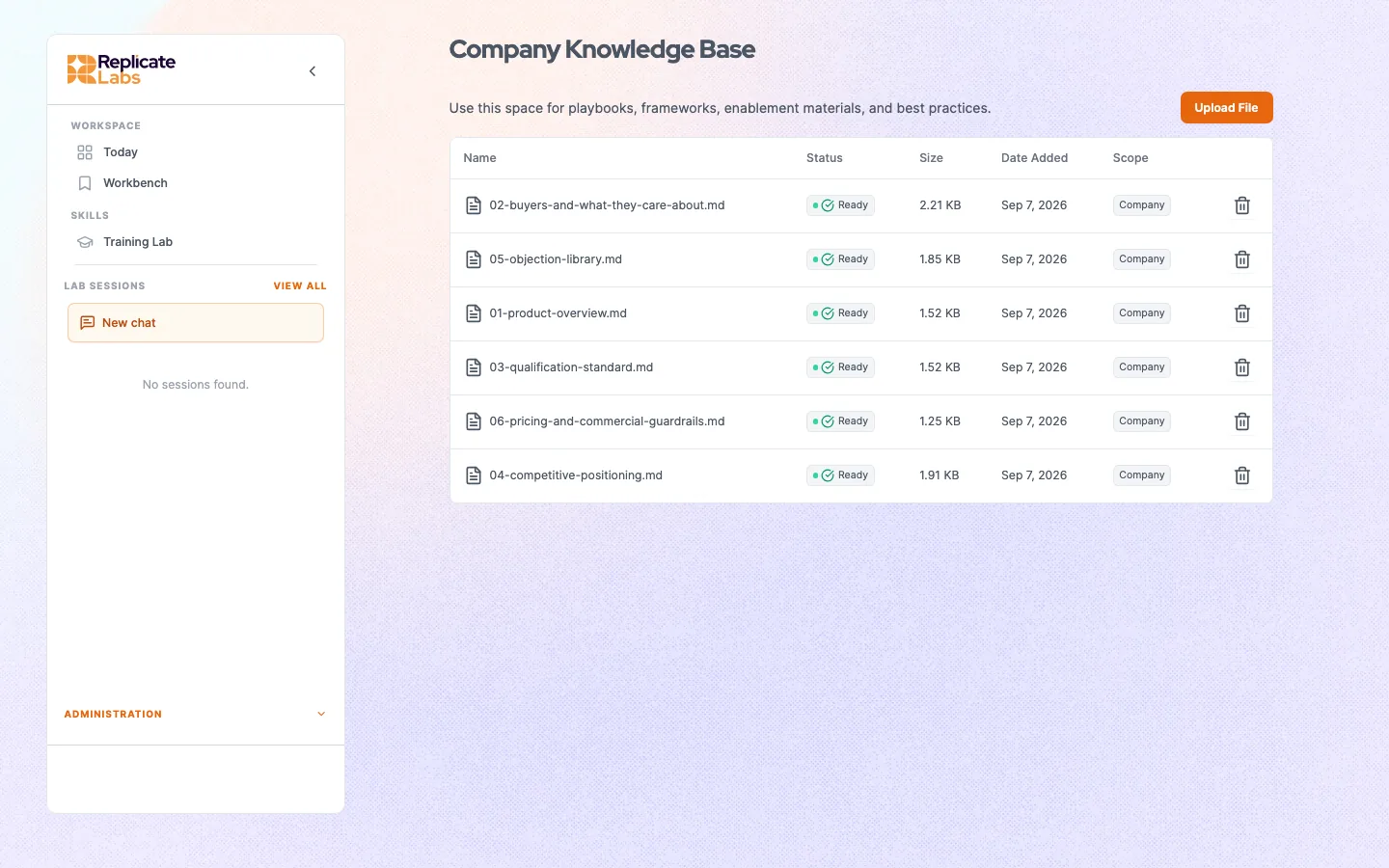
The company knowledge base. Every document shows its scope and whether it has finished indexing. Uploaded is not the same as Ready.
Uploaded is not indexed
A successful upload does not mean the coach can use the document yet. Wait for the ready status before you test, or you will conclude the content is wrong when it simply has not been indexed. This is the single most common false alarm on a new account.
## Formats that fail quietly
Three cases index as empty or near-empty, with no error to tell you.
Scanned PDFsAn image-only PDF has no text layer, so there is nothing to index. It uploads fine and contributes nothing. If your source is a scan, get a text version or transcribe it.
Image-heavy decksA slide deck whose content lives in graphics indexes slowly or stalls. Extract the text to Markdown and upload that instead. Clean text indexes far more reliably and near-instantly.
Layout-heavy documentsAnything where meaning depends on visual arrangement rather than words loses that meaning on the way in. Rewrite it as prose or a table.
Three quiet failures. All three look identical to a successful upload in the document list.
**Rule of thumb: markdown and plain text beat everything.** If a document matters, spend the ten minutes converting it. The retrieval quality difference is larger than any prompt change you could make instead.
## Testing that it landed
Do not test by asking the coach whether it has read a document; it will give you an accommodating answer. Test by asking a question **only** answerable from that document, and check the specifics.
Good: "What is our list price for the mid tier and what is the standard discount authority?" Bad: "Do you know about our pricing?"
## Replacing a document
Re-uploading does **not** replace an existing document. It adds a second one, and both are then retrievable.
For a straightforward superseding version this is usually harmless, because a consistent newer document simply adds detail. It is actively dangerous when the new version **contradicts** the old one, for example a price change: the coach can then retrieve either, and you will get inconsistent answers that are very hard to diagnose.
Delete the superseded document rather than layering over it whenever the content contradicts.
## What to load first
In this order, because the return drops steeply after the first three.
1. **Products.** What you sell, how it is packaged, what it costs, what it does not do.
2. **Buyers.** The titles you sell to, what each cares about, the objections they actually raise.
3. **Qualification standard.** What your organisation requires before a deal is called qualified.
4. Competitors, and how you position against each.
5. Methodology material, if your coach's methodology is customised to your organisation.
---
# Building roleplays
Section: Administration
Source: https://replicatelabs.ai/docs/admin/roleplay-config
Composing a roleplay from a persona, a scorecard and a product, the order things must be built in, and how to make one feel like a real call.
A roleplay is a binding of configured objects. Build the parts, then bind them.
## Build order
The order matters, because two of the objects are prepared asynchronously and a roleplay cannot bind something that is not ready.
1PersonaThe buyer. Required.
2ProductOptional. Prepared asynchronously, so create it before you need it.
3ScorecardRequired. The standard the conversation is graded against.
4RoleplayBinds persona and scorecard, optionally a product, plus the scenario itself.
Four objects, in order. Attempting the binding before a product has finished preparing is the usual first-time stumble.
## The persona
Covered in detail in [Personas](/docs/roleplay/personas). The fields that most change the conversation:
Personas on an account. Build the buyers your team actually meets, then bind them into scenarios.
- **Responds well to** and **responds badly to**. These do more work than anything else. Write them from real buyers: what actually opens your buyers up, and what actually shuts them down.
- **Industry knowledge.** How much they already know about your category. Get this wrong and a first-meeting scenario plays like a bake-off, or the reverse.
A persona can carry an avatar so it appears on camera as a person.
## The scenario
There is no difficulty setting. The scenario is expressed through three things.
Starting sentimentWhere the buyer begins. Sceptical, neutral, warm, actively defensive.
Sentiment driftWhich way they move as the conversation goes on, and what moves them. This is what makes it feel like a call rather than an interrogation.
Custom instructionsThe specifics of this encounter. What has already happened, what they are not going to volunteer, what they will do if pushed on price.
The scenario is three fields. Drift is the one most often left at default and the one that most improves realism.
Design the drift, not the difficulty
"Hard" is not a useful target. A buyer who starts sceptical and warms only if the rep quantifies the problem teaches quantifying. A buyer who starts polite and cools as the rep presents features teaches restraint. Decide what the roleplay is for, then set the drift so that behaviour is the thing that moves it.
## Binding and publishing
The roleplay binds the parts. Once built you can publish it so it appears for reps, and deploy it across a team so everyone runs the same scenario.
Configured roleplays. Each row shows what it binds: the buyer, the standard it grades against, and the product in play.
Publishing to a team is how you get comparable results. Keep the scorecard stable while a cohort works through it, or the comparison is not a comparison. See [Scorecards](/docs/roleplay/scorecards).
## Making one that reps take seriously
Do
Build from a conversation your team actually has this quarter.
Put a real objection in the buyer's own words into the custom instructions.
Give the buyer something specific to withhold until it is earned.
Match the scorecard to the conversation type. A discovery scorecard on a negotiation scenario marks reps down for the wrong thing.
Do not
Build a generic difficult buyer. Nobody sells to one.
Reuse another organisation's scenario unedited. The specifics are the whole value.
Make the buyer uniformly hostile. It is not harder, it is just unwinnable, and reps stop running it.
Ship a scenario nobody has run end to end at least once.
## Reps can build them too
Where enabled, reps can turn a real situation into a roleplay from inside the coach. That is usually the best source of scenarios you have, because it comes from a conversation someone actually had. Review what they build and promote the good ones to published.
---
# Building scorecards
Section: Administration
Source: https://replicatelabs.ai/docs/admin/scorecard-config
Writing items, levels and feedback instructions that grade consistently, and the two mistakes that make a scorecard useless.
A scorecard is the standard a conversation is graded against. Getting it right is the highest-leverage configuration work on the account, because every roleplay result and every management read downstream inherits its quality.
## The structure
ItemOne capability. A scorecard is a set of them. Aim for the handful that actually decide outcomes in your business rather than a complete taxonomy of selling.
LevelsUnder each item, what each grade looks like as observable behaviour.
Feedback instructionWhat the rep is told at each level. This is where your organisation's coaching voice lives.
Item, levels, feedback. Most of the quality is in the levels.
## Levels must be behavioural
This is the whole craft. A level written as an adjective cannot be graded consistently by anyone, human or otherwise.
Scorecards on an account. Several short scorecards, each grading one kind of conversation, beat one long one that grades all of them badly.
Item: Quantified the problem Level 3: Got a number from the buyer and confirmed how it was arrived at Level 2: Got a number, did not test it Level 1: Established a problem exists, no number attempted
The test: could two different people, reading only the level descriptions, watch the same conversation and land on the same grade? If not, rewrite until they could.
## Feedback instructions
Write what you would say to the rep, in your organisation's voice, at that level. Not the definition of the level again.
- **At the top level**, name what they did so it is repeatable. "You asked for the figure and then asked how they got to it. That second question is what makes the number usable."
- **At the middle**, name the one thing missing. Exactly one.
- **At the bottom**, give the words. A rep at level one usually does not know what the behaviour sounds like, and telling them to do it more does not help.
## Two mistakes
Too many items
A twenty item scorecard produces a grade nobody reads and feedback nobody acts on, and it makes every roleplay feel like an exam. Six to ten items covering the capabilities that actually decide your deals will change more behaviour than a complete one.
Editing it once results exist
Scores are only comparable while the scorecard is unchanged. Edit items or levels and every earlier grade was produced against a different standard, with no offset that repairs it. Tune the scorecard hard in the first few weeks, then freeze it, and record the date you froze it so any report spanning that line can say so.
## Match the scorecard to the conversation
A scorecard grades one kind of conversation. Binding a discovery scorecard to a negotiation roleplay marks reps down for not doing something they were never attempting, which reads to them as the tool being broken and is a fast way to lose a rollout.
If your team runs four distinct conversation types, you need four scorecards, not one long one.
## Where to start
Do not write one from scratch. Take the qualification standard your organisation already uses, the one in your deal review template or your methodology material, and turn each requirement into an item. If a requirement cannot be turned into observable behaviour, it was never a standard, and finding that out is useful on its own.
---
# Coach configuration
Section: Administration
Source: https://replicatelabs.ai/docs/admin/coach-configuration
What is configured on a coach, which parts you change yourself and which go through your provider, and the change that most often breaks a live account.
A coach is a configured object. Some of it you maintain; some of it is changed with your provider, because getting it wrong takes a working coach off the air for every rep at once.
## Where the line sits
You maintain
The knowledge base: products, buyers, competitors, standards.
Personas, products, scorecards and roleplays.
Users, teams, tags and roles.
Which roleplays are published and to whom.
Changed with your provider
The coach's prompts and methodology.
Its button row.
Which skills it carries.
Adding a new coach, or branding one.
The configuration boundary. Everything on the right can affect every rep on the account simultaneously, which is why it is not self-served.
## What is on a coach
- **Methodology prompts.** The framework it reasons from, in its rep-facing and manager-facing forms. A coach can hold both, which is how a single coach serves reps and their managers with different behaviour.
- **Buttons.** The row above the composer, per role. See [Coach buttons](/docs/coaching/coach-buttons).
- **Skills.** The repeatable jobs it can run. See [Skills](/docs/coaching/skills).
- **Identity.** Name, avatar and voice.
## The change that breaks accounts
A button can be live and still do nothing
A button that invokes a skill only fires when that skill is loaded for the user. Those two things are configured in different places, and a mismatch is silent: the rep clicks, nothing happens, no error appears anywhere.
This means a coach can look correctly configured on every screen you can inspect and still be dead in a rep's hands. It has happened on live accounts.
Two consequences worth holding on to.
**Asking the coach to run the skill by name is not a valid test.** Invoking a skill conversationally can succeed while the button that invokes the same skill does nothing, because they resolve it differently. A natural-language test will pass on a coach whose buttons are all dead.
**The only real test is a click.** Sign in as a user who holds the affected role, on the affected coach, and click the actual button. Anything short of that is checking configuration rather than checking the product.
## When you change a coach
Ask your provider for the change to be staged rather than applied live:
1. Applied on a test coach first and clicked through end to end.
2. Applied to the live coach in a window where someone can verify.
3. Verified by a real click on the rep surface, not by inspecting configuration.
4. With a way back. A snapshot taken before the change restores the previous state quickly.
## Multiple coaches
An account can run more than one: typically a rep coach and a manager coach, sometimes several rep coaches for different methodologies or business units.
Each carries its own history with each user, its own buttons and its own skills. Users switch through the coach selector, and the platform remembers the last one selected per user. That last detail causes more confused support requests than anything else on this page: a user on the wrong coach sees the wrong buttons and reasonably concludes something is broken.
---
# Planning a deployment
Section: Administration
Source: https://replicatelabs.ai/docs/admin/planning-a-deployment
The nine-box: one agreed planning grid that decides what gets configured, so the account is built from a plan rather than accumulated.
The failure mode for a well-intentioned rollout is an account that accumulates. Someone builds a roleplay, someone else uploads a document, a scorecard gets written for one team, and six months later nobody can say what the deployment is for.
The fix is one agreed planning grid, settled before anything is configured.
## The nine-box
Three columns, three cells each. Every cell is a real job someone does, in their words.
Rep plays
Prepare for a named callA specific upcoming conversation, rehearsed against the buyer they will actually meet.
Work a stalled dealThe opportunity that has gone quiet, taken to the coach rather than to the forecast call.
Handle the objection we keep losing toThe one that actually costs you deals, practised until it is not a surprise.
Manager plays
Team snapshotWhere the team is and who needs an hour this week.
One repPreparing a specific coaching conversation with evidence.
Coverage riskWhere the forecast is thinner than it looks.
Foundation
Deploy across the teamOne scenario everyone runs, so results are comparable.
Standing cadenceThe rhythm that keeps it in the week rather than in a launch.
Review rhythmThe recurring look at whether anything is actually changing.
An example grid. Yours should be your organisation's jobs in your organisation's words. This one is illustrative, not a template to adopt.
## Each column compiles to something different
This is the part that gets missed. The columns are not three lists of the same kind of thing.
Rep playsCompile into roleplays. Each cell yields a persona, a scorecard and optionally a product, bound into a roleplay whose scenario is the cell itself. See Building roleplays.
Manager playsDo not become roleplays. They are the manager coach surface, driven by its prompts and its button row, and they are configured with your provider.
FoundationNeither. These are programme decisions: which roleplays are published to which teams, what the standing cadence is, and how often you review.
The fan-out. Treating manager cells as roleplays is the single most common planning error, and it produces roleplays nobody runs.
## Agreeing it is the one human gate
Everything downstream is a projection of the grid, so the grid is where the argument should happen. Once it is agreed, configuration is largely mechanical, and a cell that changes tells you exactly which objects to rebuild.
Draft it from evidence rather than opinion where you can: recorded calls, the deals you actually lost last quarter, and what reps say they are stuck on. Then get it agreed by the person accountable for the number, not just by enablement.
## Keeping it honest
Treat the grid as canonical. When someone edits a roleplay or uploads a document directly, that is fine, but it should be visible as drift from the plan rather than quietly becoming the plan.
Revisit it once a quarter. Cells that no reps use are telling you something: usually that the cell described a job the business talks about rather than one anybody does.
---
# Integrations
Section: Connect your tools
Source: https://replicatelabs.ai/docs/integrations/overview
Connecting the tools your team already works in, what each one changes about the coaching, and how they are set up.
The coach gets better the more of the real deal it can see. Connecting your existing tools means it works from the state of the opportunity rather than from your description of it.
The platform connects to a very large catalogue of tools. Four groups matter to a sales team, and they are worth doing in this order.
CRMThe opportunity as it stands: stage, value, close date, contacts, notes. Say an account name and the coach knows which deal you mean and what the forecast claims.
Call recordingPoint the coach at a call instead of describing it. It reads what was actually said.
Calendar and inboxPrepare against what is genuinely in your week, and work the real thread rather than a summary of it.
Meeting notesThe same raw material as a recording, for the conversations you take notes on rather than record.
Four groups. Call recording is the one that most changes the quality of a session in the first fortnight.
## Why the CRM connection is worth more than it sounds
The value is not that the coach can look up a close date. It is that the coach can see the **disagreement** between the record and what you just told it.
A deal at 80% with no confirmed budget holder, or a close date inside a month with no meeting booked, are exactly the things a coach should raise and a rep should never have to volunteer. Most of the useful friction in a coached forecast comes from that gap.
## Why call recording is worth doing first
What was said on a call is reliably different from what the rep remembers being said. Working from the transcript rather than the recollection is the fastest route to a session that changes someone's mind about the product.
If you connect one thing in week one, connect this.
## Setting them up
Integrations are configured at the account level by an administrator, not per rep. If a tool your team lives in is not connected, that is a conversation with your administrator rather than something to work around.
## Bringing the coach into ChatGPT and Claude
Your reps are already using a general assistant every day, and its output is not your methodology. The coach can be connected into those assistants so the answers come back aligned. See [ChatGPT and Claude](/docs/integrations/chatgpt-and-claude).
---
# ChatGPT and Claude
Section: Connect your tools
Source: https://replicatelabs.ai/docs/integrations/chatgpt-and-claude
Connecting your coach to the assistant your reps already use, what it gives you, and where the platform is still the better place.
Most reps already have a general AI assistant open all day. They are drafting emails in it, prepping calls in it, and thinking through deals in it. The output is fluent, confident, and not your methodology.
Where your account has it enabled, the coach can be connected into those assistants so that when a rep asks for help with a deal, the answer comes back from the coach that knows your business.
## What it gives you
No new habitThe rep works where they already work. The adoption problem for this route is close to zero, which is the whole argument for it.
Your standard, not a generic oneGrounded in your methodology and your account knowledge instead of general sales advice.
The same dealsThe opportunities discussed are the ones the coach already knows.
Three reasons to bother. The first is the one that decides whether reps use it.
## Setting it up
Setup is per person and takes a few minutes, once. Your administrator or provider will give you the connection details for your account.
If your organisation restricts which assistants can be connected to internal systems, check with IT before setting this up. It is a real integration, not a browser extension, and it should go through whatever review your organisation applies to those.
## Where the platform is still better
This route is for the fast question in the flow of a rep's day. Three things do not come with it.
- **The call.** Talking a deal through with the coach on camera is where the coaching actually happens.
- **Roleplay and scoring.** Rehearsing against a persona and getting graded stays in the platform.
- **Anything a manager sees.** Engagement and scores come from platform activity.
Use the assistant connection for the quick question. Open a call for the deal that matters.
---
# Authentication and access
Section: Security and data
Source: https://replicatelabs.ai/docs/security/access
Sign-in methods, the role model, single sign-on, and how access is scoped between organisations.
## Sign-in methods
| Method | Availability |
| --- | --- |
| Email and password | All accounts |
| Google | All accounts |
| Your own identity provider | Enterprise accounts, by agreement |
Enterprise accounts can authenticate against their existing identity provider, Okta for example, so users sign in with the credentials they already have and access is governed by your existing joiners and leavers process.
If single sign-on is enabled for your organisation, use it as the only route. Password accounts and single sign-on identities are not automatically the same person, and a stray password account is an access route that survives your directory removing someone.
## Roles
Access is governed by a list of roles per user, drawn from `admin`, `manager` and `user`. A user holds several, and the surface changes to match, so one person does not need a second login to hold a second capacity.
Team membership carries its own role in addition, which is how a manager can manage one team while being an ordinary user elsewhere in the account.
Full detail in [Users, teams and roles](/docs/admin/users-teams-roles).
## What an administrator can and cannot reach
An `admin` role grants configuration (users, teams, knowledge, personas, products, scorecards, roleplays) and reaches the account's records across the whole company rather than one team: roleplay transcripts, call transcripts and scorecard results. It also permits resetting a user's coaching history.
Coaching conversations reach an administrator the same way they reach a manager, as summary and observations through a coach rather than as a transcript. See [What you can see](/docs/managers/what-you-can-see).
Worth stating in your own rollout material
Reps will ask. Give them the real shape rather than a reassurance that will not survive contact: roleplays, call transcripts and scores are visible to their manager, and what they work through with their coach travels upward as what they are working on rather than as a transcript. Vagueness here costs you adoption, because people assume the worst version.
## Separation between organisations
Each organisation's account is scoped separately. Knowledge, personas, scorecards, roleplays and conversations belong to one account, and requests are scoped to the account of the signed-in user.
Where your deployment is delivered through a partner, you contract with that partner and the software is supplied to them. The same account separation applies.
## Leavers
Deactivate to remove access while retaining history. Delete when the person, their data or the account must actually be erased. Deactivation is reversible; deletion is not. See [Data, retention and deletion](/docs/security/data).
---
# Data, retention and deletion
Section: Security and data
Source: https://replicatelabs.ai/docs/security/data
What is stored, who can reach it, how deletion works, and what to tell a security reviewer.
## What is stored
Coaching conversationsChats and calls with a coach, so it can carry a deal between sessions. Scoped to the individual user, and reported upward as observations rather than as a record. See What you can see.
Roleplay and call transcriptsThe conversation itself and its graded result. Readable by the rep, by managers of their teams, and by administrators across the company.
Account knowledgeDocuments an administrator has uploaded. Scoped to the company, a team or a tag.
Four categories. The first two are the ones a security review will ask about, and they are governed differently.
## Who can reach it
- **A rep** reaches their own conversations, transcripts and scores.
- **A manager** reaches roleplay and call transcripts, scorecard results and engagement for the teams they manage, plus coaching conversations as summary, key points and observations through their coach.
- **An administrator** reaches the same records across the whole company, plus configuration and account knowledge. An administrator can also reset a user's coaching history, which clears it irreversibly.
The line is not that coaching content is withheld. It is that coaching content reaches a manager as a read framed for what a manager needs, rather than as a transcript of what someone said.
## Deactivation and deletion
Deactivate
The user can no longer sign in. Their data remains. Reversible. Use for role changes, leave, and anything you might need to undo.
Reset coaching history
Clears a user's conversations, chats and the memory built from them. Irreversible, and available to managers for their own teams as well as to administrators.
Deactivate first unless you have specifically been asked to erase, because a reset cannot be recovered to answer a later question about what happened on an account. Full deletion of a user or of the account, for an erasure request, is handled as a request to us rather than from inside the product.
## Answering a security review
The questions that come up almost every time, and where the answer lives:
| Question | Answer |
| --- | --- |
| How do users authenticate? | Email and password, Google, or your own identity provider on Enterprise. See [Authentication and access](/docs/security/access). |
| Can we use our own SSO? | Yes, on Enterprise accounts, against your existing provider. |
| How are roles managed? | A list per user of `admin`, `manager`, `user`, plus a role on each team membership. |
| Can we remove a user and their data? | A user can be deactivated in product, and their coaching history can be reset irreversibly. Full deletion of a user or an account is handled as a request rather than a self-served action. |
| Can a manager read a rep's coaching sessions? | Not as a matter of course. Product surfaces expose summaries and the manager coach is built to report rather than replay, but the sessions are within its reach. Roleplay and call transcripts are readable in full. |
| Is our data separated from other customers? | Yes. Requests are scoped to the account of the signed-in user. |
| Who do we contract with? | Directly, or with your partner where the deployment is partner-delivered. |
For current certifications and the formal security position, see the [security page](/security). For anything not covered here, [ask us](/contact) rather than inferring it: a security questionnaire answered from a guess is worse than one answered late.
---
# Glossary
Section: Reference
Source: https://replicatelabs.ai/docs/reference/glossary
Every term used across the platform and these docs, defined once.
## Account
Your organisation on the platform. Carries the seat limit, the knowledge base, and all configured personas, products, scorecards and roleplays. Sometimes called the company.
## Coach
An AI coach built from a methodology, a memory of your deals, your organisation's knowledge, and a voice you can talk to. Your coach has a name and a face in your workspace. Accounts often run more than one, typically a rep coach and a manager coach.
## Coach button
A control above the composer. Does exactly one of three things: opens a screen, runs a skill, or drops a prompt template into the composer. Configured per account, per coach and per role. See [Coach buttons](/docs/coaching/coach-buttons).
## Composer
The message box on the coach home.
## Drift
See *sentiment drift*.
## Feedback instruction
Part of a scorecard item. What the rep is told when they land at a given level, written in your organisation's coaching voice. See [Building scorecards](/docs/admin/scorecard-config).
## Item
One capability assessed by a scorecard, with a level description for each grade.
## Knowledge base
What the coach knows about your business: products, buyers, competitors, standards, methodology material. Scoped to the company, a team or a tag. Maintained by an administrator, shared, and distinct from a rep's private conversation history. See [What your coach knows](/docs/admin/knowledge-base).
## Level
Under a scorecard item, what a given grade looks like as observable behaviour.
## Manager coach
A coach built to reason about a team rather than an opportunity. Draws on roleplay and call transcripts, scorecard results and engagement, plus coaching conversations as summary and observations rather than as transcripts. See [The manager coach](/docs/managers/manager-coach).
## Memory
What a coach carries between your conversations: accounts discussed, what buyers said, what you committed to do. Scoped to the individual user and carried across the coaches they use. Reaches a manager as observations rather than as a record. See [What your coach remembers](/docs/coaching/memory).
## Nine-box
The planning grid used to decide what a deployment is for, before anything is configured. Three columns, rep plays, manager plays and foundation, three cells each. See [Planning a deployment](/docs/admin/planning-a-deployment).
## Persona
The buyer in a roleplay. Configured from a role, a personality, what they respond well and badly to, and how much they know about your category. Can carry an avatar so they appear on camera. See [Personas](/docs/roleplay/personas).
## Product
An optional object bound into a roleplay so the buyer's objections concern your actual offer. Prepared asynchronously after creation.
## Role
One of `admin`, `manager`, `user`. A user holds a list of them, and team membership carries its own. Not the same as a seat. See [Users, teams and roles](/docs/admin/users-teams-roles).
## Roleplay
A live spoken practice conversation against a persona, graded against a scorecard. Binds a persona and a scorecard, optionally a product, plus the scenario. See [How roleplay works](/docs/roleplay/overview).
## Scorecard
The standard a conversation is graded against, built from your organisation's methodology. Made of items, levels and feedback instructions. See [Scorecards](/docs/roleplay/scorecards).
## Seat
One named human. Accounts carry a seat limit; zero means unlimited. Seats are not shared.
## Sentiment drift
Which way a roleplay buyer's attitude moves during the conversation, and what moves it. The main lever for realism, and the reason there is no difficulty setting. See [Building roleplays](/docs/admin/roleplay-config).
## Skill
A repeatable job built into a coach so the output holds one standard. Runs in a single pass rather than as an interview. See [Skills](/docs/coaching/skills).
## Tag
A label used to scope knowledge or configuration to a set of users who are not a team.
## Team
A group of users. Determines manager visibility, knowledge scoping and roleplay deployment. Membership carries its own role.
---
# Troubleshooting
Section: Reference
Source: https://replicatelabs.ai/docs/reference/troubleshooting
The failures that produce no error message, in the order they actually happen, with the check that identifies each.
Most problems on the platform fail quietly rather than loudly. This page is organised by symptom, and every entry is something that will not show you an error.
## A call will not start
**Microphone permission.** The most common cause by a distance. The browser blocks access, the call never properly starts, and nothing says so.
Check the permission indicator in the address bar and allow the microphone for the site, then reload. If your organisation manages browser policy centrally, permission may be denied at that level and needs IT rather than you.
Also worth checking: whether another application is holding the microphone, and whether you are on a browser your organisation has locked down for media.
## A button does nothing when clicked
**The skill it invokes is not loaded for you.** A button that runs a skill fails silently if the skill is not available to your user.
You cannot fix this from the rep surface. Report it with the **button label**, the **coach you were on**, and **your role**. Those three facts are what an administrator needs; without them the diagnosis takes days. See [Coach configuration](/docs/admin/coach-configuration).
## The buttons are wrong, or a button has disappeared
**You are on a different coach than you think.** The platform remembers your last coach selection between sessions, so you can return days later on a coach you switched to once.
Check the coach selector at the top left first. Buttons belong to a coach **and** to your active role, so a manager looking at the rep coach correctly sees rep buttons.
## The Training Lab looks wrong or empty
**Check which coach is active first.** The coach selector is at the top left, and the platform remembers your last selection between sessions, so you can return days later on a coach you switched to once. The scenarios and personas listed are the ones configured for that coach and account.
If the list is genuinely empty, nothing has been published to you yet, which is a configuration question rather than a fault. See [Building roleplays](/docs/admin/roleplay-config).
## The coach does not know something about our business
Distinguish two cases, because they go to different people.
- **Wrong about your deal.** Correct it in the conversation. It carries forward. This is yours to fix.
- **Wrong about your products, pricing or competitors.** A [knowledge base](/docs/admin/knowledge-base) gap. This belongs with your administrator.
## A document was uploaded but the coach cannot use it
Four causes, in order of likelihood.
1. **It has not finished indexing.** Upload succeeding is not the same as being ready. Wait for the ready status.
2. **It is a scanned PDF.** No text layer means nothing to index. It will look uploaded and contribute nothing.
3. **It is an image-heavy deck.** Extract the text to Markdown and upload that instead.
4. **You tested it badly.** Asking "do you know about our pricing?" gets an accommodating yes. Ask something only answerable from the document and check the specifics.
## Answers contradict each other between sessions
**Two documents in the knowledge base disagree.** Re-uploading does not replace, it adds, so an old price list and a new one can both be retrievable.
Find the superseded document and delete it. This is the hardest problem on this page to diagnose from the symptom, so check it early whenever answers are inconsistent rather than merely wrong.
## A manager's team view is empty
**The team has no members.** An empty team reports nothing and receives nothing published to it, and neither state produces an error. Check membership before anything else.
## A rep cannot be added
**The seat limit.** Nothing else will explain it. An administrator can see the limit on the account.
## Roleplay scores dropped across the team
Before concluding capability has fallen, rule out three things.
1. **The scorecard was edited.** Grades before and after are against different standards and are not comparable.
2. **A new roleplay was deployed.** A different scenario grades differently.
3. **People ran short sessions.** A four minute conversation produces a score computed from four minutes of evidence.
## Still stuck
Include these when you report anything: what you clicked, which coach was active, your role, and what you expected instead. [Contact us](/contact).
---
# Questions we get asked
Section: Reference
Source: https://replicatelabs.ai/docs/reference/faq
Direct answers on privacy, methodology, what the coach will and will not do, and the questions reps ask in week one.
## Can my manager see what I do with my coach?
Partly, and it is worth knowing the exact shape.
**As records:** your roleplay transcripts, your call transcripts and your scorecard results. Your manager can read those in full, and an administrator can across the whole company.
**As observations:** the coaching conversations themselves. Your manager can ask their coach what the team is working on, where the pipeline risk is, what people are stuck on, and gets summary, key points and observations. Reporting draws on the same material. What they do not get is a transcript of your session.
The platform is built to mirror a reporting line on purpose. You tell your manager the messy version, they tell their boss what matters. See [What you can see](/docs/managers/what-you-can-see).
## Will the coach join my live customer calls?
No. It does not sit on the call feeding you prompts. It works with you before the call and after it, and on the deal in between.
## Does it replace my sales manager?
No. It gives your manager back the hours they were spending on coaching that was not happening, and a read on where the team is genuinely weak. The conversation with a human is still the point.
## Can my coach work a methodology it was not built on?
It will reason alongside another framework if you ask, but its own methodology remains its core and it will keep returning to it. That is the intended behaviour rather than a limitation: a coach that adopts whichever framework you named last has no standard to hold you to.
If your organisation needs a coach whose primary methodology is different, that is a configuration question for your provider rather than something you prompt around.
## What happens if it gets my deal wrong?
Tell it, plainly, in the conversation. The correction carries forward. Do it as soon as you notice, because an uncorrected wrong fact gets reasoned from in every later session.
## Why does it keep asking me questions instead of answering?
It is establishing what you confirmed as against what you assumed. That distinction is the whole of the methodology, and the gap it finds is usually the reason the deal is stuck. If you genuinely want the answer without the interrogation, say so and it will give you its read on what it has.
## Why is the second session better than the first?
The first is mostly the coach getting the deal into its head. The second can compare what you said with what happened. Judging the product on session one is judging it before it has the information it runs on. See [What your coach remembers](/docs/coaching/memory).
## Is the coach the same for everyone in my company?
The coach is, and the knowledge base is. Your history is not: it is scoped to you, so a colleague asking the same coach about your accounts gets nothing of yours. Your own history follows you across the coaches you use.
## A button did nothing. Is it broken?
Probably not broken for everyone. A button that runs a skill fails silently when that skill is not loaded for your user. Report the button label, the coach you were on and your role. See [Troubleshooting](/docs/reference/troubleshooting).
## Why do my scores keep moving when I feel the same?
Most often the scenario changed, or the scorecard was edited. Scores are only comparable while the scorecard behind them is unchanged. Judge yourself on whether the same criterion is still your weakest, not on the total. See [Reading your score](/docs/roleplay/reading-your-score).
## Can I use it from ChatGPT or Claude?
Where your account has it enabled, yes. See [ChatGPT and Claude](/docs/integrations/chatgpt-and-claude). The full experience, including calls, roleplay and everything a manager sees, stays in the platform.
## Can we use our own single sign-on?
On Enterprise accounts, against your existing identity provider. See [Authentication and access](/docs/security/access).
## Can we remove a user and their data?
A user can be deactivated in product, and their coaching history can be reset, which is irreversible. Removing a user or an account outright, for an erasure request, is handled as a request to us rather than as a self-served action. See [Data, retention and deletion](/docs/security/data).
## Something here is not covered
[Tell us.](/contact) These docs are new, and we would rather write the page than answer the same email twice.